Interview Templates - Linking your Email Communications
Last updated: October 12, 2026
Once you create your interview panel, you can go to the Email Communication tab to link your email templates that you've already created to your scheduling workflow.
There are 4 main workflows in GoodTime:
Request Availability: Email to candidate to collect availability
Schedule Now/ Request Availability Confirmation: Email to confirm the interview with the candidate
Request Availability (Reschedule): Email to reschedule and request additional availability
Schedule Now (Reschedule): Email to confirm the new interview date and time with the candidate
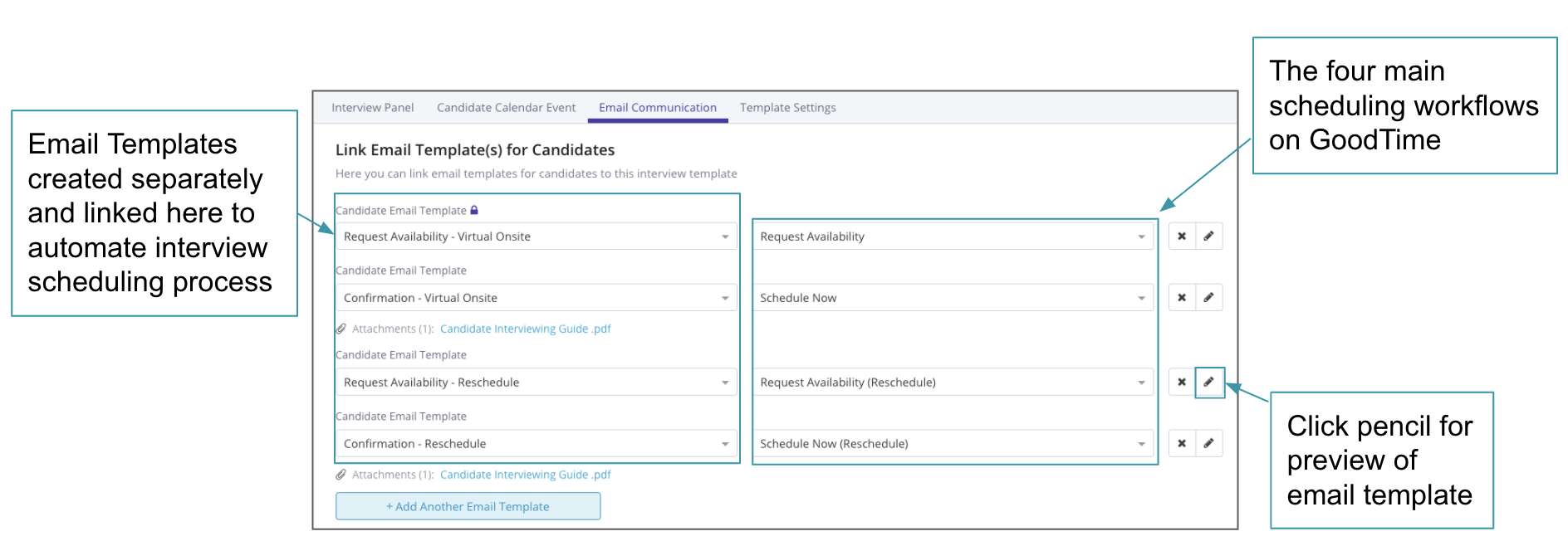
Finding & Linking Email Template
Navigating the Dropdown Menu
The template selection dropdown may initially present a limited subset of your available templates.
If you do not see your desired template immediately, type a relevant keyword into the search bar inside the dropdown.
Example: If
Confirmation // HW - Coop Onsitedoes not appear in the initial list, typing "Coop" into the search field will display the matching template.
What if a Template Doesn't Appear?
If a search yields no results, the template may not simply be hidden—it could be unavailable or filtered out due to specific configuration or visibility settings. If a template remains missing after searching, further investigation into the template's settings may be required.
Additional Features & Next Steps
Would you like to add a Greet & Walk, or a quick way to notify your recruiters of candidate interviews? You can add Greet & Walkouts to your interview template.