SMS Consent, Opt-In & Opt-Out
Last updated: September 18, 2026

TL;DR: Before sending candidates SMS/Text messages through GoodTime, make sure your organization follows the consent and messaging requirements that apply to your recruiting communications.
For US-based SMS messaging, organizations should provide candidates with a clear way to consent to SMS communication and a clear way to opt out.
GoodTime helps manage candidate messaging preferences by recognizing supported consent information and blocking future SMS messages when a candidate replies STOP.
This article explains how candidate SMS consent, opt-in, and opt-out work in GoodTime.
Important: Messaging and consent requirements can vary by jurisdiction and use case. Your organization is responsible for determining the legal and compliance requirements that apply to its candidate communications.
USA Regulations: When sending SMS/Text Message to candidates within the USA you will need to comply with A2P 10DLC regulations; that is 'Application to Person, 10 digit long code' cell phone message sending. This is a government requirement to ensure that the application and organization sending SMS/Text Messages to individual citizens (that is GoodTime and your organization) will not be sending any SPAM messages via SMS to cell phones.
GoodTime will project manage this approval process and it will typically start with your team providing all necessary information as outlined in this
Candidate Opt-In
A recommended way to collect SMS consent is during the job application process. For example, your organization can add a required application question such as:
Do you consent to receiving SMS/Text messages regarding your application and recruiting process?
Candidates can then indicate whether they consent to SMS communication before your recruiting team begins messaging them.
Greenhouse: Automatically Recognizing SMS Consent
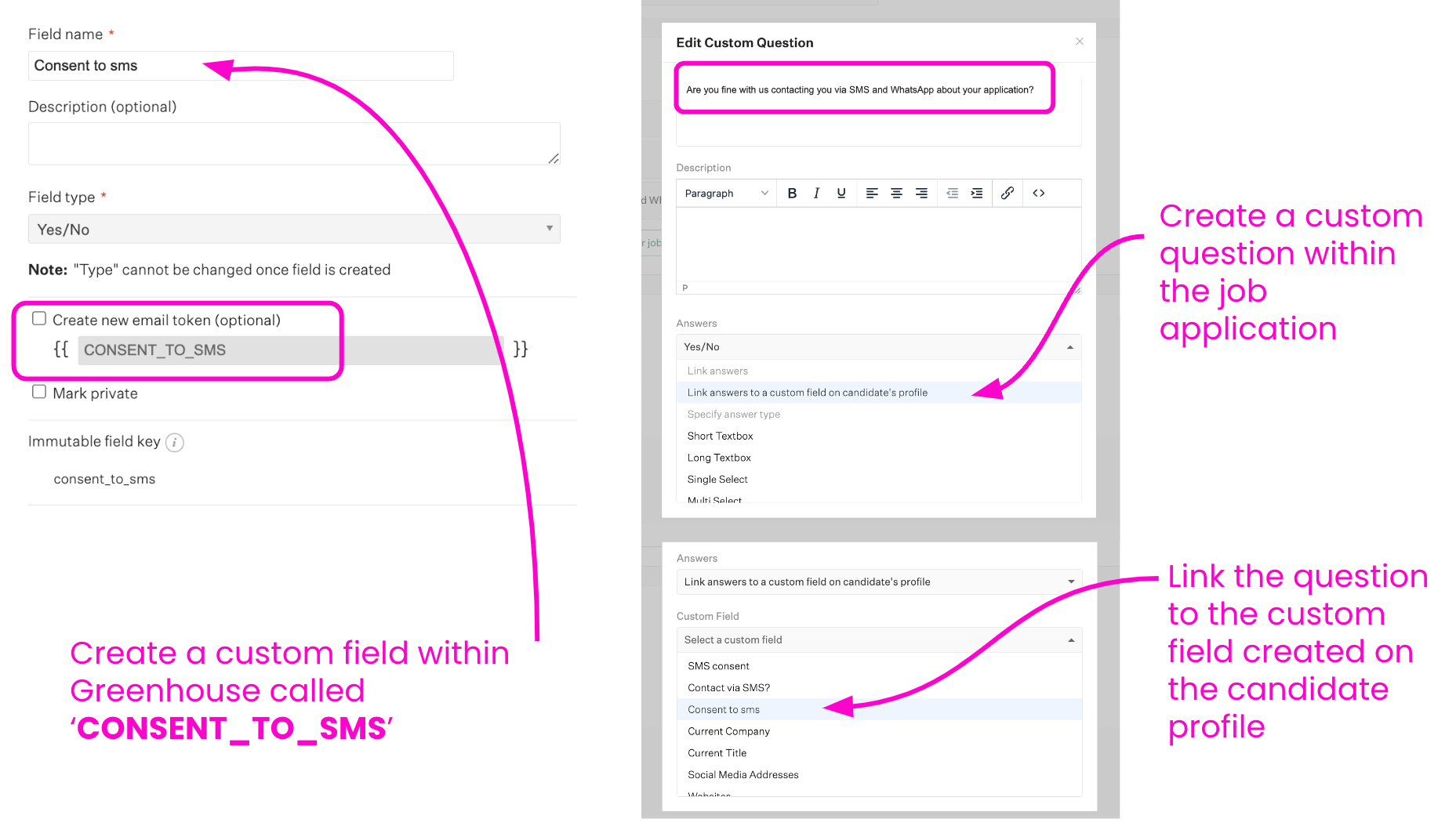
GoodTime can automatically recognize supported SMS consent information from Greenhouse when the application question and candidate field are configured correctly.
To configure this:
Create a custom candidate field named CONSENT_TO_SMS in Greenhouse.
Create a required SMS consent question within the job application.
Link the application question to the CONSENT_TO_SMS candidate field.
Confirm that the candidate's response is being recorded in the corresponding field.
When configured correctly, GoodTime can use this information to determine whether SMS engagement should be allowed for that candidate.
Other ATS Platforms
For ATS platforms where GoodTime cannot automatically recognize the candidate's SMS consent response, you can still collect consent during the application process.
Your recruiting or scheduling team should verify the candidate's recorded consent in the ATS before initiating SMS communication.
Candidate Opt-Out via SMS
Candidates must also have a clear way to stop receiving SMS messages. For your initial SMS communication, include clear opt-out instructions such as:
Reply STOP to opt out of future SMS messages
This makes the candidate aware of how they can stop receiving SMS communications.
What Happens When a Candidate Replies STOP?
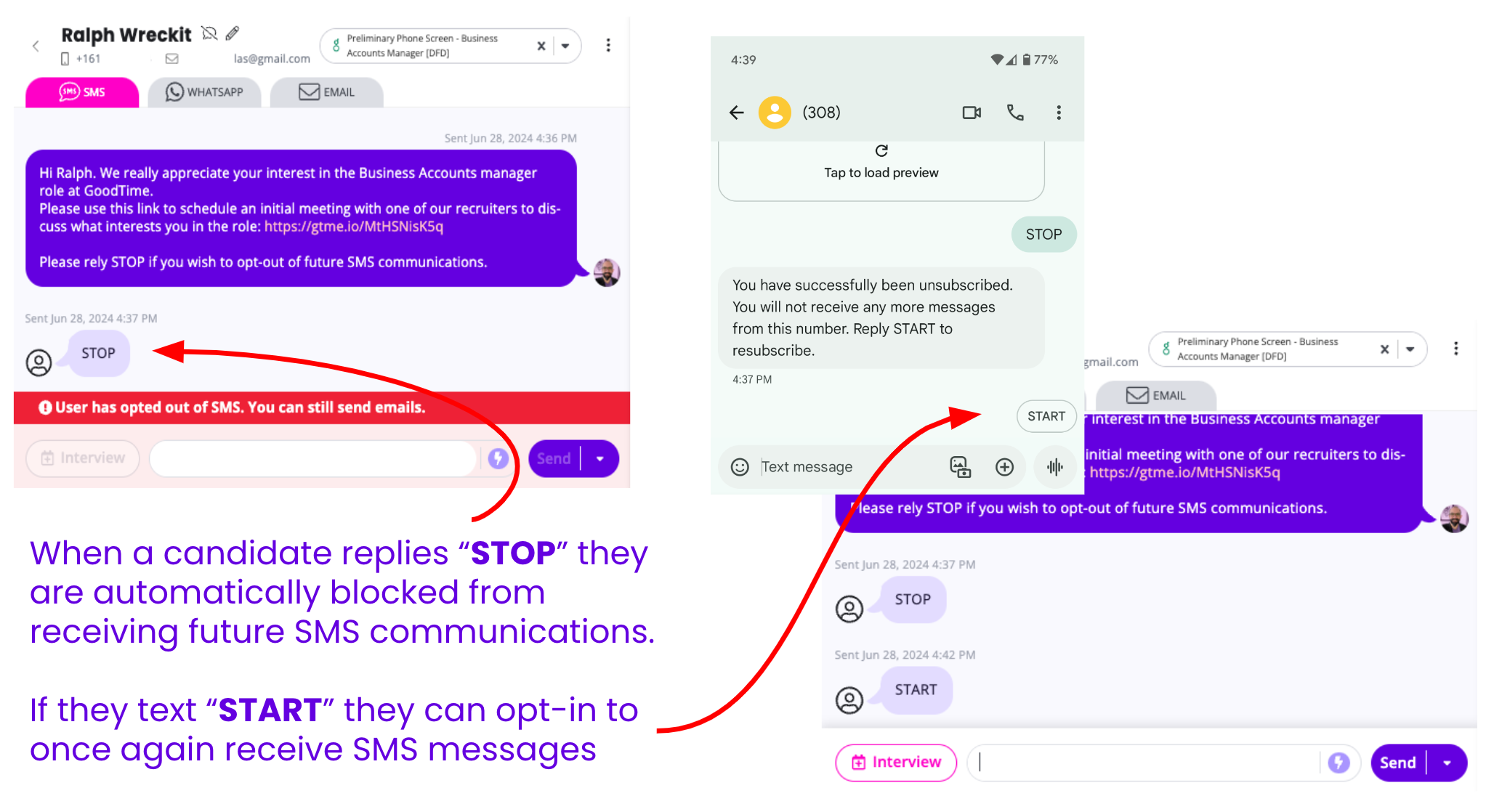
GoodTime automatically recognizes supported SMS opt-out responses such as STOP.
When a candidate opts out:
GoodTime records the candidate's SMS opt-out status
The candidate is blocked from receiving additional SMS messages through GoodTime
Recruiting and scheduling users can no longer continue SMS outreach to that candidate through GoodTime

The important distinction is:
Your organization should provide clear opt-out instructions to the candidate, while GoodTime handles the supported STOP response and prevents additional SMS communication after the candidate opts out.
What Happens In An Automated Workflow?
If a candidate opts out of SMS while participating in an automated workflow, GoodTime will stop using SMS for that candidate.
When the workflow contains remaining candidate communications, GoodTime can automatically transition those communications to email rather than continuing to send SMS messages.
This allows the workflow to continue while respecting the candidate's SMS preference.
Before Launching SMS Outreach
Before your team begins SMS outreach, confirm that:
Your organization's GoodTime SMS number has been configured
Your organization has established an appropriate SMS consent process
Recruiters understand where candidate consent is recorded
Greenhouse customers using automated consent recognition have configured the CONSENT_TO_SMS field correctly
Your initial SMS messaging includes clear opt-out instructions
Your team understands that candidates who opt out cannot continue to receive SMS messages through GoodTime
Automated workflows have an appropriate fallback communication channel where needed
Need Help Setting Up or Using SMS?
For instructions on phone-number configuration, localized phone numbers, templates, screening questions, scheduled messages, and sending SMS through GoodTime, see:
SMS & WhatsApp Messaging - Setup & Usage
To learn where candidate conversations and replies are managed, see: