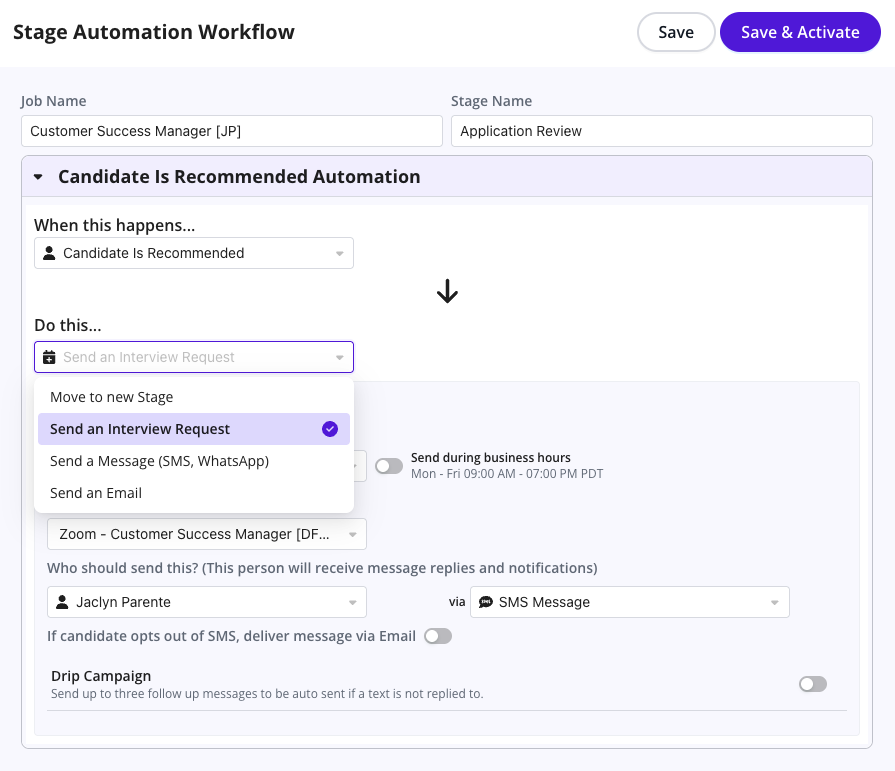
Automated Workflow - Stage Change Automations
Last updated: September 17, 2026
TL;DR: Workflow Automations, available with GoodTime HIRE: Agentic Plan, allow recruiting teams to automatically take action when specific events occur during the hiring process.
Instead of relying on recruiters or coordinators to manually monitor candidates and complete repetitive follow-up tasks, you can configure GoodTime to respond automatically to events such as :
A candidate entering a particular ATS stage
Interview feedback being completed
A candidate meeting defined conditions
A scheduling or recruiting action requiring follow-up
A workflow can contain multiple actions and can use conditional logic, timing rules, messaging channels, and other settings to determine what happens next.
This article explains the core components of Workflow Automations and how they work together.
For a specific example of using timed follow-ups, see Automated Workflows - Drip Campaigns.
What is a Workflow Automation?
A Workflow Automation tells GoodTime:
When this happens -> evaluate these conditions -> take these actions.
For example:
A recruiter moves a candidate from Application Review to Recruiter Screen in the ATS.
GoodTime can then automatically:
Send the candidate a message
Ask the candidate to provide availability or self-schedule
Use a predefined message template
Wait until the appropriate business hours before sending the outreach
The recruiter moves the candidate forward in the ATS, and GoodTime handles the next operational steps automatically.
How Workflow Automations Work
Most workflows can be thought of as four components:
Trigger -> Conditions -> Actions -> Timing & Delivery Rules
Not every workflow needs all four components, but understanding this structure makes it easier to design and troubleshoot your automations.
1. Triggers
A trigger determines when GoodTime should evaluate and begin a workflow. Depending on the workflow and your ATS integration, triggers can include events such as:
Candidate Stage Changes
A workflow can begin when a candidate reaches a particular hiring stage.
For example:
Application Review -> Recruiter Screen
This can be used to automatically initiate candidate outreach or scheduling when your recruiting team advances the candidate in the ATS.
All Scorecards Complete
A workflow can also begin when all required scorecards for a candidate's interview stage have been completed.
This allows the next recruiting action to begin as soon as interview feedback is available rather than waiting for a coordinator or recruiter to manually check whether all feedback has been submitted.
For example:
All Scorecards Complete -> Evaluate Feedback -> Advance or Flag Candidate
2. Conditions
Conditions allow you to control whether an automation action should occur. Instead of applying the same action to every candidate, you can define IF/THEN-style rules that evaluate candidate or interview information before continuing.
For example:
IF all scorecards are rated at or above your required threshold THEN move the candidate candidate to the next stage
Or:
IF candidate recommendation = Not Recommended
THEN follow the disposition workflow
Conditions are especially useful when different candidates should follow different paths based on interview outcomes.
Example
After all scorecards are complete:
Recommended candidates can move automatically to the next stage
Review candidates can remain in the current stage for recruiter review
Not Recommended candidates can follow a different workflow
This helps teams automate repeatable decisions while preserving human review where it is needed.
3. Actions
An action is something GoodTime performs after a workflow is triggered and any required conditions are satisfied. A single workflow can contain multiple actions. Available actions may include:
Send candidate communications
GoodTime can send candidate outreach through supported communications channels, including: Email, SMS/Text, and WhatsApp.
You can use predefined templates to standardize the content candidates receive.
For SMS setup and consent requirements, see:
SMS & WhatsApp Messaging - Setup & Usage
Request candidate availability
GoodTime can automatically ask a candidate to provide availability for an upcoming interview. This is useful when advancing candidates to an interview stage where scheduling should begin immediately.
Initiate automatic scheduling
Where your scheduling workflow supports it, GoodTime can move the candidate directly into an automated scheduling experience.
Move a candidate to another stage
For supported ATS configurations, Workflow Automations can automatically move candidates through the recruiting pipeline. This can be combined with conditions to create workflows such as:
All Scorecards Complete -> Candidate Recommended -> Move to Next Stage
Set a candidate recommendation
Workflow Automations can assign supported recommendation statuses such as:
Recommended
Review
Not Recommended
These recommendation buckets can also help teams identify candidate status within Job Pipeline.
Cancel unnecessary roundups
Where supported, a workflow can cancel a roundup or meeting when the recruiting team already has enough information to make the next decision. This helps avoid unnecessary interviewer meetings and reduces coordination work.
Multiple Actions in a Workflow
A workflow is not limited to a single action. You can configure multiple actions to occur as part of the same recruiting process.
For example:
Trigger: Candidate moves to Recruiter screen
Actions:
Send candidate outreach
Request availability
Initiate scheduling
Update the recruiting workflow as appropriate
Similarly, you can create multiple Workflow Automations for the same hiring stage when different events or conditions should result in different outcomes.
Timing and Business Hours
Automations do not always need to occur immediately. Timing settings allow you to control when actions should take place.
Delays
You can configure a delay before an action occurs.
For example:
Candidate enters Application Review -> Wait 24 hours -> Send follow-up
Delays are also the foundation for building Drip Campaigns, where multiple candidate communications are sent at defined intervals.
For more information, see:
Automated Workflows - Drip Campaigns
Business Hours
You can also limit certain workflow actions to defined business hours.
For example:
Monday - Friday, 9:00 AM - 5:00 PM
This helps prevent candidate communications from being delivered at inappropriate times.
Messaging Channels and Fallback Rules
Workflow Automations can use supported candidate communication channels as part of an automated process.
For example, a workflow might use SMS as the primary communication method.
If the candidate has opted out of SMS, the workflow can use email as a fallback channel rather than continuing to send text messages. This allows the recruiting workflow to continue while respecting the candidate's messaging preference.
For information about SMS consent and opt-out behavior, see:
Example Workflow: Application to Recruiter Screen
Here is an example of how the different components work together.
Trigger
Candidate moves from: Application Review -> Recruiter Screen
Conditions
Confirm that he candidate meets any required workflow criteria.
Actions
GoodTime:
Send the candidate a message
Requests availability or provides the appropriate scheduling experience
Uses the configured message template
Begins scheduling without requiring additional recruiter intervention
Timing
The message can:
Send immediately
Wait for a defined delay
Send only during configured business hours
The result is a recruiting workflow that begins with a simple ATS stage change and continues without requiring the recruiter to manually initiate each subsequent action.
Example Workflow: Interview Feedback to Next Stage
Workflow Automations can also be used after an interview.
Trigger
All Scorecards Complete
Conditions
Evaluate the candidate's interview feedback
Actions
Depending on the result
Recommended
-> Assign Recommended status
-> Move candidate to the next stage
Review
-> Assign Review status
-> Leave candidate for recruiter or hiring team review
Not Recommended
-> Assign Not Recommended status
-> Follow the appropriate next-step workflow
This allows teams to automate straightforward outcomes while maintaining human oversight for candidates who require additional review.
Creating a Workflow Automation
When designing a workflow, work through these questions in order:
What should start the workflow?
Choose the recruiting event that should trigger the automation.
Does the workflow apply to everyone?
If not, define the conditions that determine which path the candidate should follow.
What should GoodTime do?
Choose one or more actions.
When should those actions occur?
Determine whether the action should:
Happen immediately
Wait for a defined period
Occur only during a specified business hours
How should the candidate be contacted?
Choose the appropriate messaging channel and configure fallback behavior where necessary.
Workflow Design Best Practices
Before enabling a workflow broadly:
Start with a clearly defined recruiting process
Identify which steps currently require repetitive manual work
Use conditions when different candidate outcomes require different treatment
Keep candidate-facing messages clear and appropriate for the stage
Consider business hours before enabling automated outreach
Confirm your SMS configuration and consent process before using text messaging
Test the workflow with a controlled candidate scenario before using it broadly
Confirm that required interview templates, scorecards, and ATS stages are configured correctly
Drip Campaigns
A Drip Campaign is a specific type of Workflow Automation that uses delays and multiple communications to follow up with candidates over time.
For example:
Request Availability -> Wait 24 hours -> Reminder -> Wait again -> Final follow-up
For details on setting up drip campaigns, see:
Automated Workflows - Drip Campaigns
One of the most powerful capabilities available with GoodTime HIRE: Agentic Plan is workflow automation. Through GoodTime's integration with your ATS, Workflow Automations can automatically trigger recruiting actions based on a candidate's movement between stages in the ATS.
ATS triggered Workflow Automation:
Imagine whenever you move a candidate from the 'Application Review' to the 'Recruiter Screen' stage in your ATS GoodTime automatically send an email/text message direct to the candidate thanking them for their application and asking them to click on a link to automatically book their 30-minute recruiter screen. Having simply moved a candidate forward to the next stage of the recruiting pipeline in your ATS you have just triggered the candidate to book time directly in your calendar for a recruiter screen... without any additional clicks! No need to imagine any more as the above example is completely possible thanks to GoodTime Workflow Automations available with the Agentic Plan 🤖
The following video provides a demo of these new features. Also listed below are summaries of the workflow automation actions available to users of GoodTime's HIRE: Agentic Plan:
1) New Automated Workflow Builder (Revamped UX + More Power)
A redesigned Workflow Automations experience with a new look and feel and significantly expanded capability. Historically, workflow automations were limited (e.g., one workflow per stage, one action per workflow). The new builder removes those constraints, allowing multiple workflows per stage and multiple actions per workflow, with a consistent editing experience whether you manage workflows inside Job Pipeline or the Automations area.
This was built to let teams automate more of the hiring workflow end-to-end without relying on manual coordinator effort. It supports more sophisticated, real-world processes (where multiple things should happen at once or different actions should occur depending on outcomes), while keeping configuration accessible to ops teams.
2) Conditional Logic in Automations (IF/THEN style rules)
A major expansion in workflow power is the introduction of conditional logic. Instead of workflows firing “for everyone,” you can now define rules that determine when actions should execute (e.g., only if interview feedback meets certain thresholds). For example, an automation can trigger only when “all scorecards are ≥ Yes,” or handle different paths for candidates marked “Not recommended” vs. “Review.”
This was built to help teams standardize decision-making and speed up workflows while still respecting nuance. Conditional logic reduces manual sorting, helps hiring teams move quickly on strong candidates, and creates more consistent handling of edge cases—especially valuable when your pipeline is high volume or when consistency is required across many teams.
3) New Automation Trigger: “All Scorecards Complete”
GoodTime introduced a new automation trigger that fires when all scorecards are completed for a candidate at a given stage. This enables downstream automation the moment hiring feedback is fully captured—without waiting on a coordinator to check completeness or chase interviewers manually.
This was built to tighten feedback loops and reduce time-to-decision. The practical value is faster candidate movement, fewer stalled candidates, and less operational overhead for TA teams—especially in fast-moving hiring environments where delays can cost you top talent.
4) New Automation Actions: Candidate Recommendation Buckets, Move Stage, Cancel Roundups
The webinar highlighted multiple new workflow actions, including the ability to set candidate recommendation (Recommended / Review / Not Recommended), automatically move a candidate to the next stage based on feedback, and even cancel roundups when they’re no longer needed. The “recommendation buckets” also show clearly within Job Pipeline, helping teams quickly visualize who is strong, who needs review, and who should be dispositioned.
These actions were built to reduce coordination work and improve interviewer time efficiency. For example, canceling roundups prevents unnecessary meetings when the team already has enough signal, while recommendation bucketing helps hiring managers quickly focus attention where it matters. Together, these actions help teams move faster, reduce wasted effort, and keep the pipeline flowing.
Workflow Automation Setup:
You can configure GoodTime to automatically invite candidates to interview when we see they are moved to the next stage within your ATS.
Allows Recruiters to manage their candiate pipeline and have GoodTime automatically reach out to candidates for availability/auto schedule without manual intervention when they are moved to the next stage in the ATS
Optional settings include:
Business hour limitations (e.g., Mon–Fri, 9am–5pm)
Delays before advancing (e.g., wait 24 hours after application)
NOTE: Greenhouse only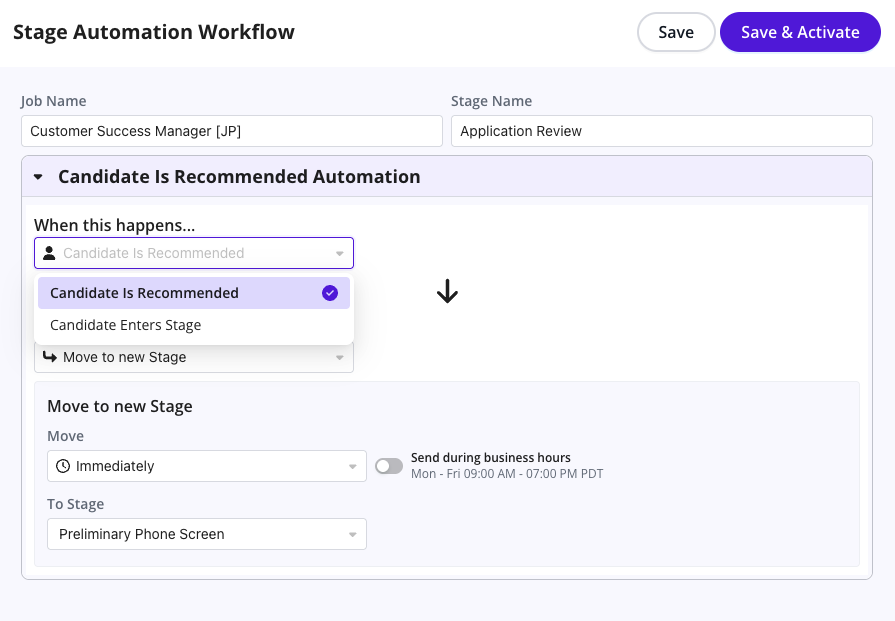
When Workflow Automation is Triggered:
GoodTime’s AI can take action when a candidate reaches a certain pipeline stage:
Send a message (via email or text) to collect availability or schedule interviews.
NOTE: Use of GoodTime's Texting feature does require additional setup and verification of US regulatory requirements
Use custom templates for outreach.
Optionally include fallback rules (e.g., if a candidate opts out of texting, send an email instead).
Business hours and scheduling delays can be configured.