Sending an Email Later
Last updated: October 12, 2026
Scheduled emails can sometimes lag by a few minutes. If you have time-sensitive materials that need to go out at a specific time, we recommend sending a separate email manually at that time instead.
How-to:
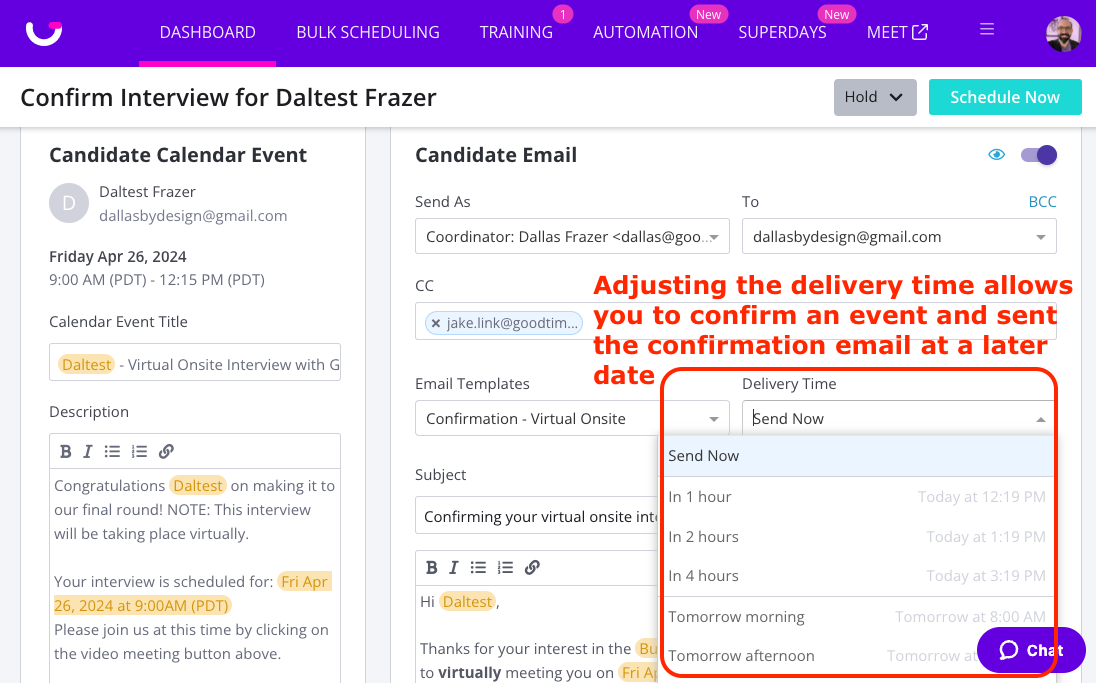
When you get to the “Confirm Interview for XX” screen in the Schedule Now flow, please do the following:
Scroll down to the Email Communication section
In the Delivery Time drop down, select when you would like the email to go out to the candidate.
When an interview has a scheduled confirmation email, it will show as "Hold Until XX" in the interview drawer. (sample below)

Notes:
If you “Don’t Send” the communication, the interview will go to Hold status.
Interviewer events will still be sent immediately.