$Variables
Last updated: October 15, 2026
TL;DR: GoodTime allows you to personalize your interview templates and emails through the use of $variables. Variables are typically pulled from your Applicant Tracking System (ATS) but can also be used to reference details of the interview you are scheduling. The following table provides you with an overview of the different $variables you are able to use within GoodTime.
All $Variables that can be used in GoodTime:
Additional variable guidance:
$Interview.InterviewLength can provide the total interview duration calculated from the event durations in the interview template attached to the flow, including in a Request Availability email before the interview is scheduled. A preview may omit this value because it does not have the full Request Availability and interview-template context. Verify that the correct template is attached and that its event durations are configured, then check the actual sent email, such as by sending it to a test candidate. A blank preview alone does not mean that the sent email will be blank. If the sent value is blank or malformed, that is not expected behavior and should be investigated.
$Candidate.Id displays the candidate's ATS-assigned ID when placed in the interviewer calendar event information. This applies to interviewer-facing calendar events and should not be confused with candidate ID fields in CSV reports, such as atsCandidateId, or assumed to describe the token's behavior in candidate emails.
$Variable Validation:
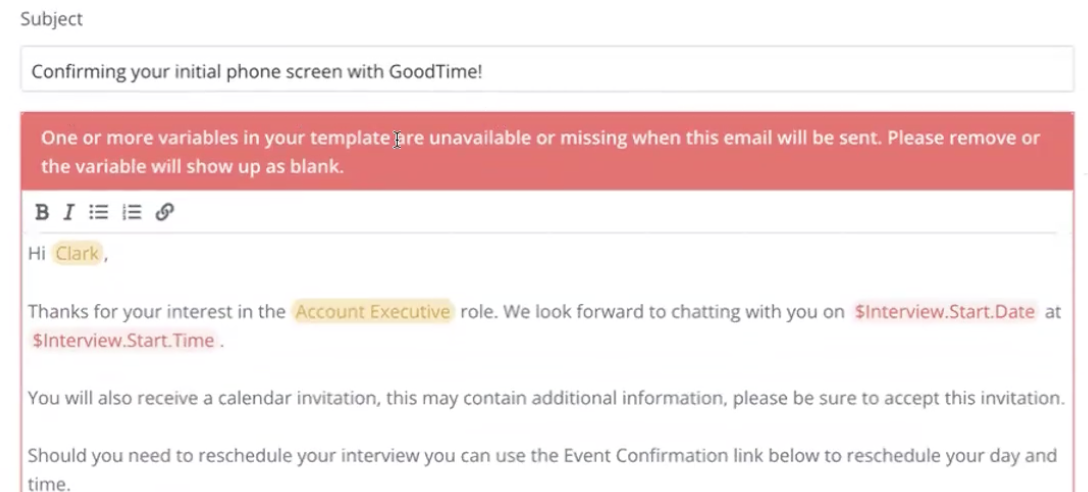
GoodTime Also employs variable validation to provide greater context to GoodTime users about where $variables can be used within the GoodTime Platform. Variable validation will flag if a $variable is placed that will NOT resolve correctly when shared with your candidate.
Variable validation will clearly flag to you with a system message when you use a $variable that will not resolve correctly. Please see the following short video for a demo of this validation in action.