Experience+ Build & Use GoodTime Scorecards
Last updated: February 26, 2026
TL;DR: If you are use the GoodTime Experience+ package and you wish to take advantage of GoodTime's AI Assisted scorecards but you do not use the Lever or Workday Applicant Tracking System you are able to use the feature in a standalone capacity.
GoodTime's AI Assisted scorecard feature can be used in a standalone capacity where you:
1. Build custom scorecards within GoodTime,
2. Assign and deliver these scorecards via the GoodTime Scheduling Process,
3. Interviewers complete their scorecard via the Interviewer Portal,
4. Review collected interviewer feedback via GoodTime.
The following sections provide an overview of each of the steps outlined above.
1. Building Custom Scorecards
If you wish to build custom scorecards directly within GoodTime you can do this in a 2-step manner by
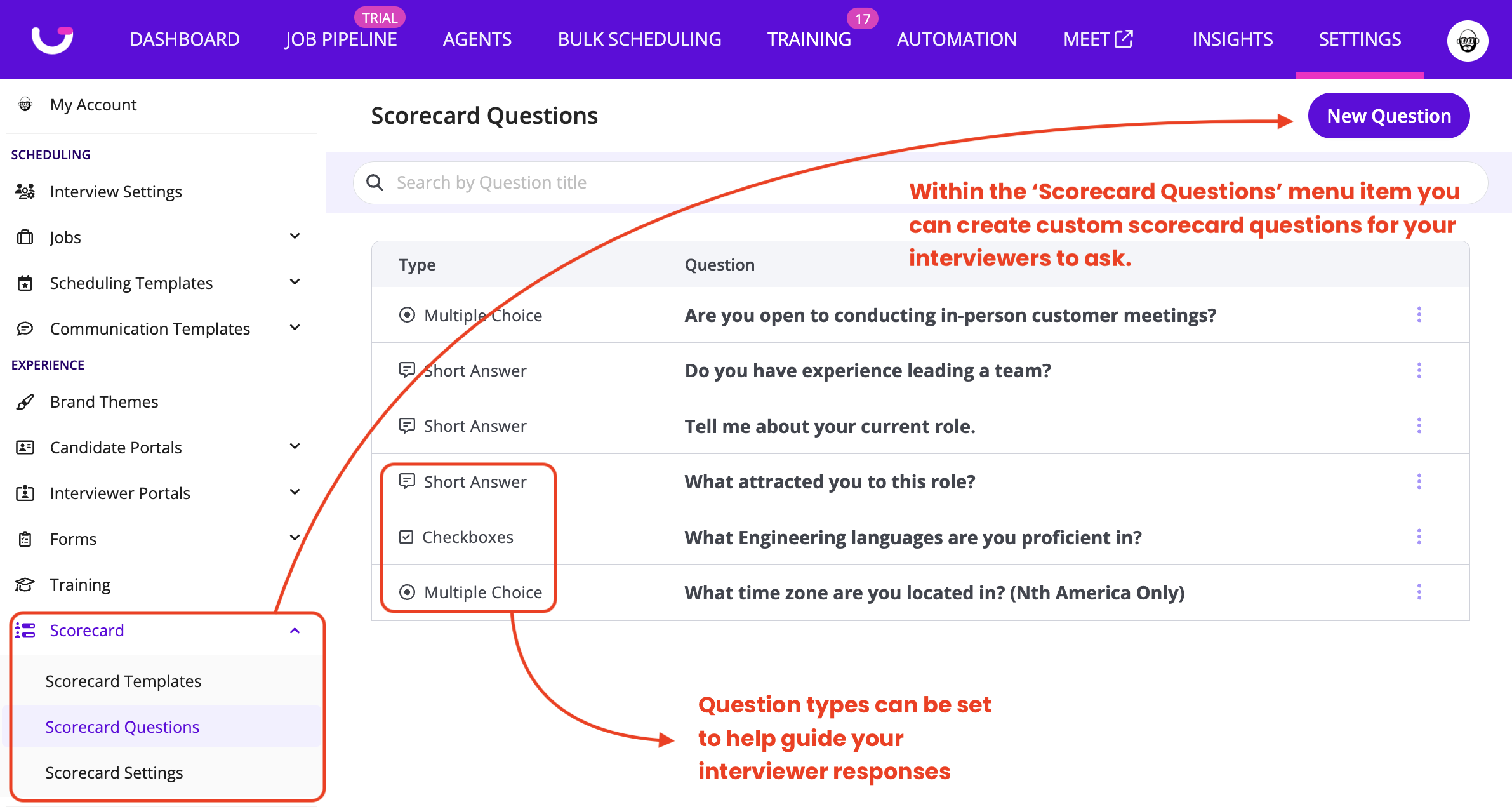
1: Create the questions that you wish to ask as part of your scorecard.
- Scorecard questions can be created via the Scorecard > Scorecard Questions menu item.
- Questions can be structured as free text, multiple choice, radio button to help guide your interviewers though the scorecard completion process.
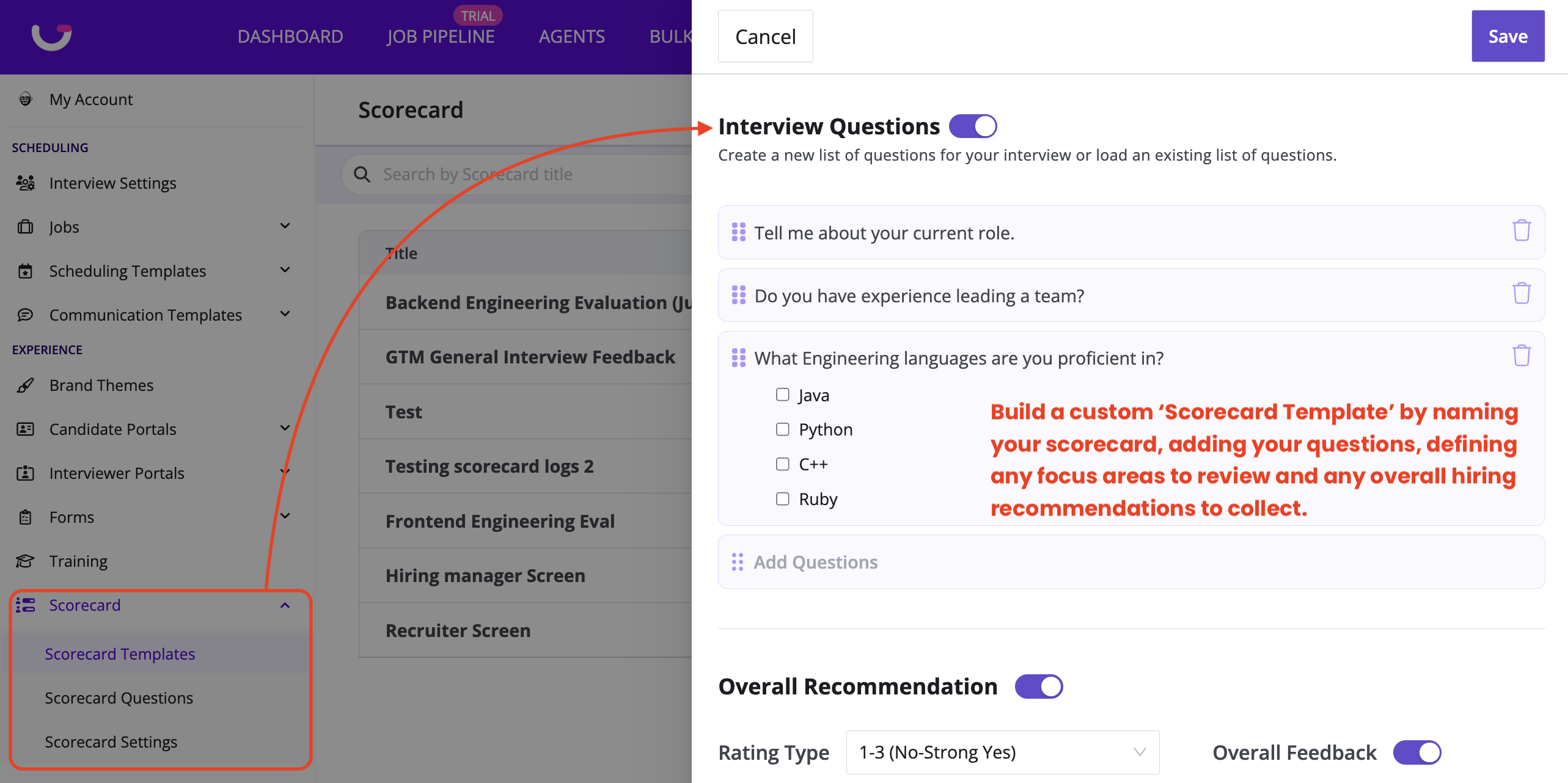
2: Build a 'Scorecard Template' that includes the specific questions your wish your interviewers to address and any focus areas and/or overall hiring recommendation you wish them to offer.
- We recommend using a clear naming convention as your GoodTime created custom Scorecard Templates can be selected form the same list as your ATS generated scorecards. If you wish to assign GoodTime's AI-Assisted scorecards you should make these scorecards easily identifiable to your scheduling team.
2. Assign and Deliver GoodTime's AI-Assisted Scorecards
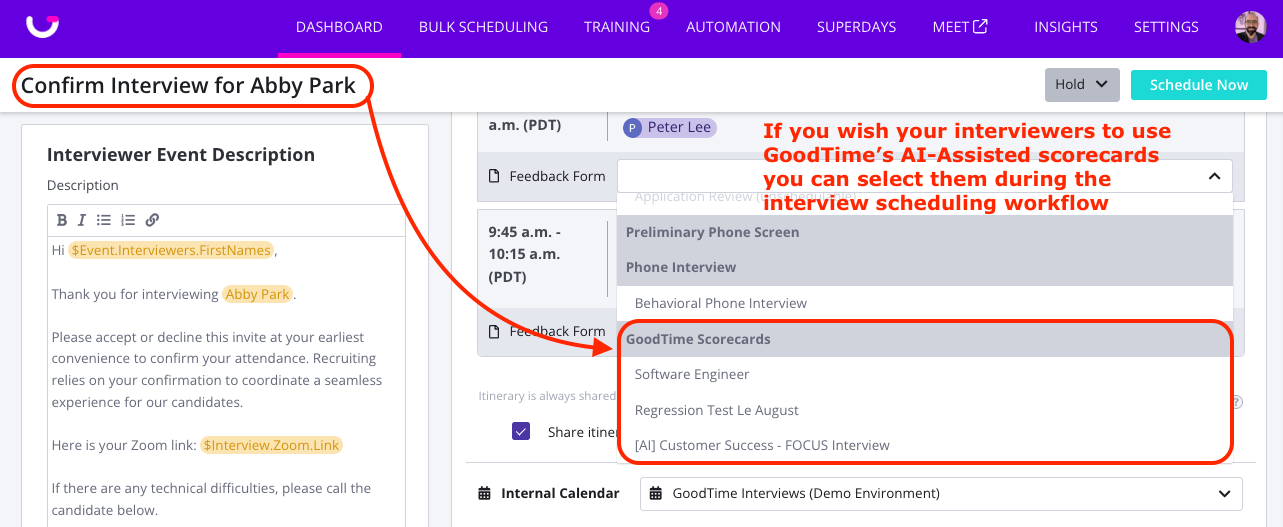
Once you have created a custom GoodTime scorecard you can select it during the scheduling process (just as you would any ATS scorecard) to be assigned to the selected interviewer to complete when they meet with the candidate.
- GoodTime's AI-Assisted scorecards that you may have created, they can be selected from the 'Feedback Form' dropdown during the scheduling workflow.
3. Interviewers access and complete assigned Scorecards
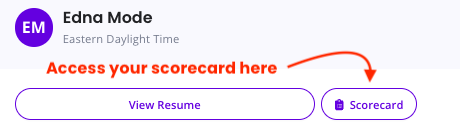
If a GoodTime AI-Assisted scorecard has been selected during the scheduling workflow your interviewers can access the assigned scorecard simply by clicking on the 'Scorecard' button in the top of their Interviewer Portal.
Using GoodTime's AI-Assisted scorecards in a standalone capacity allow you to take advantage of the AI-polish function to speed-up your feedback collection and allow for the AI-Powered scorecard summaries to help drive more focused Hiring/Decision meetings.
GoodTime's AI-Assisted scorecards allow your interviewers to:
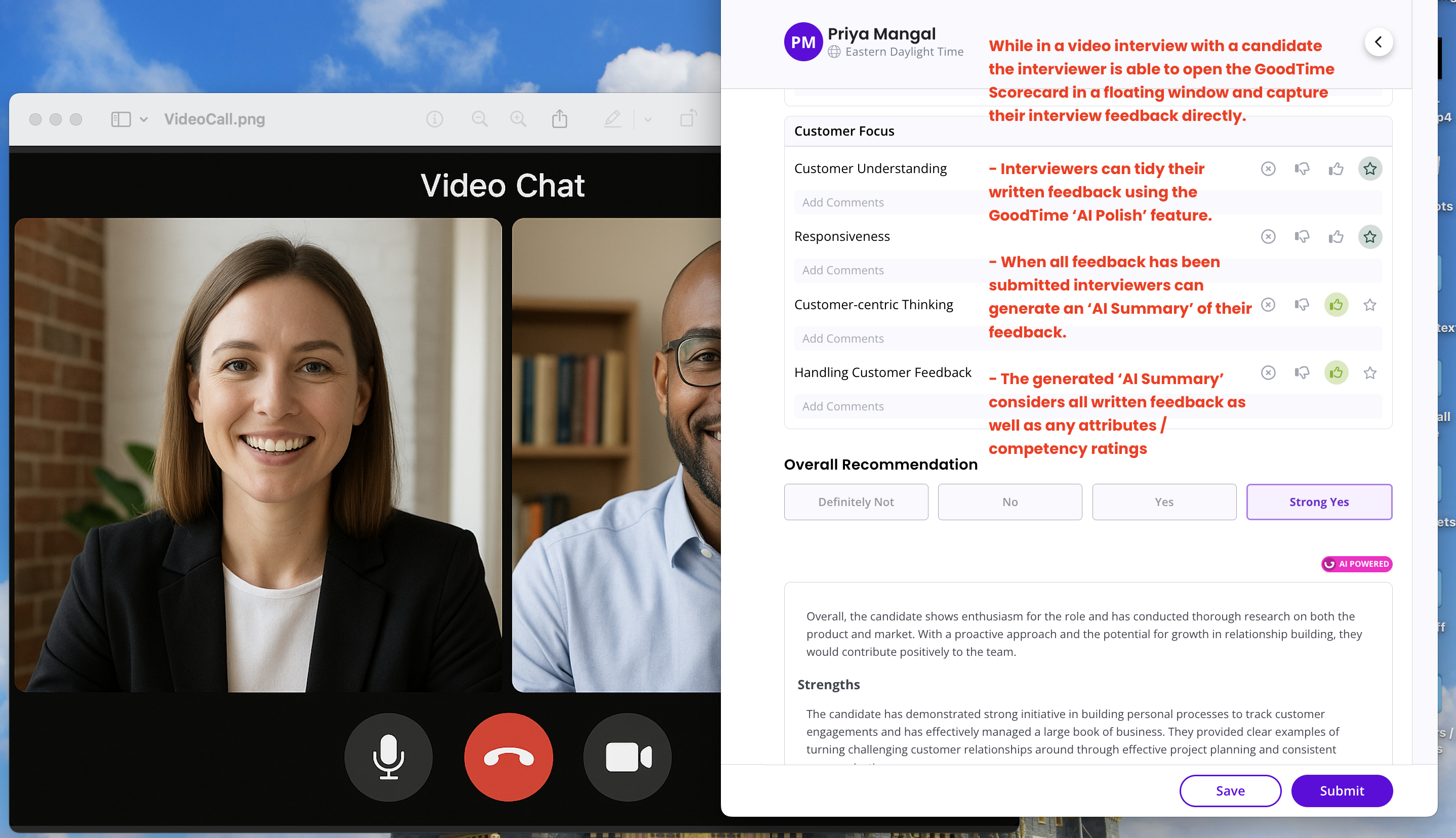
- Float the scorecard window over their interview window so they do not need to click in-and-out of a separate window to capture their feedback.
- See at a glance the candidate's work history and education to help guide their conversation.
- Provide their feedback directly into the AI-scorecard window without needing to worry about formatting or spelling - it is more important to get their feedback captured while it is top of mind, we can help tidy it up later!
- The AI-Scorecard will continually save in the background through the interview process so there is no risk of your interviewers losing their written feedback.
> Once the interview has concluded, the interviewers can simply click the 'AI-Polish' button to correct any spelling and tidy their formatting as a means of speeding up the time it takes for them to submit their feedback. NOTE: A generative AI model is used here to tidy up your interviewers feedback based on the data they present. It is recommended that your interviewers always conduct a quick review f their AI-polished feedback before submitting to ensure the intent of their feedback has been maintained.
> Once reviewed interviewers can submit their feedback with the click of a button and it will be captured against the candidates interview event within GoodTime.
4. Review collected interviewer feedback via GoodTime
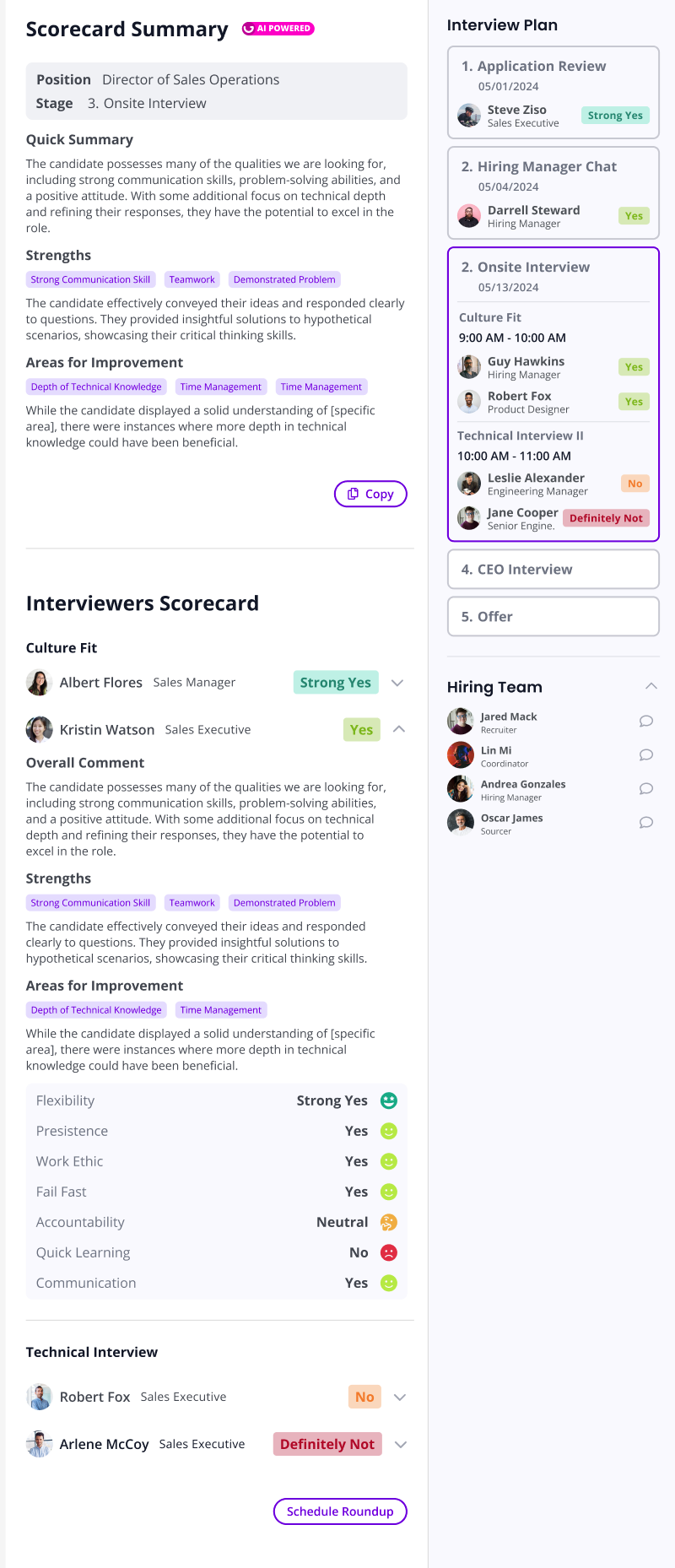
When clicking into a scheduled interview (from the GoodTime Dashboard) to open it in the side drawer you can not only access any completed scorecards, but you can also track in this location which interviewers have and have not submitted their interview scorecards.
The interview drawer also provides at a glance the final rating that each interviewer has offered. This view is available to anyone with Admin or Super Admin access (which is typically members of your recruiting team but not your interviewers themselves).
From within the interview drawer you are also able to be opened in a 'Scorecard Summary' view which allows for you to quickly conduct an AI summary of all scorecards submitted by your interview team so that you can quickly identify where all interviewers were aligned and were they were not. This Scorecard Summary can provide a valuable guide to your Recruiter and Hiring Manager as they meet with all interviewers as part of an interview Roundup / Decision Meeting.
 |
In addition to speeding-up your interviewers ability to collect and submit candidate feedback via GoodTime's AI-Assisted scorecards, we can ALSO assist your hiring managers in making a hiring decision. |