GoodTime's Integration for Microsoft Teams
Last updated: September 8, 2026
GoodTime’s Microsoft Teams integration helps keep interviewers on track by delivering automated reminders and creating shared interview group chats — similar to what many customers already use with our Slack integration.
Overview
Historically, GoodTime has only supported a Slack integration as a means of supporting additional communication with your Interviewing team. Key features of this integration support:
Reminding interviewers about upcoming interviews,
Prompting interviewers to accept/decline interview invites,
Nudging interviewers to complete scorecards after interviews, and
Creating an interview group chat so everyone involved can communicate before and after the interview
Many GoodTime customers working primarily in Microsoft Teams have requested the same workflow — and we’re excited to now offer Microsoft Teams support.
This Microsoft Teams Chat feature:
✅ Works with any ATS
✅ Is available on all GoodTime package
✅ Designed to reduce interviewer drop-off and improve follow-through
🎥 Please click here to see a video overview of this feature:
How to Get Access
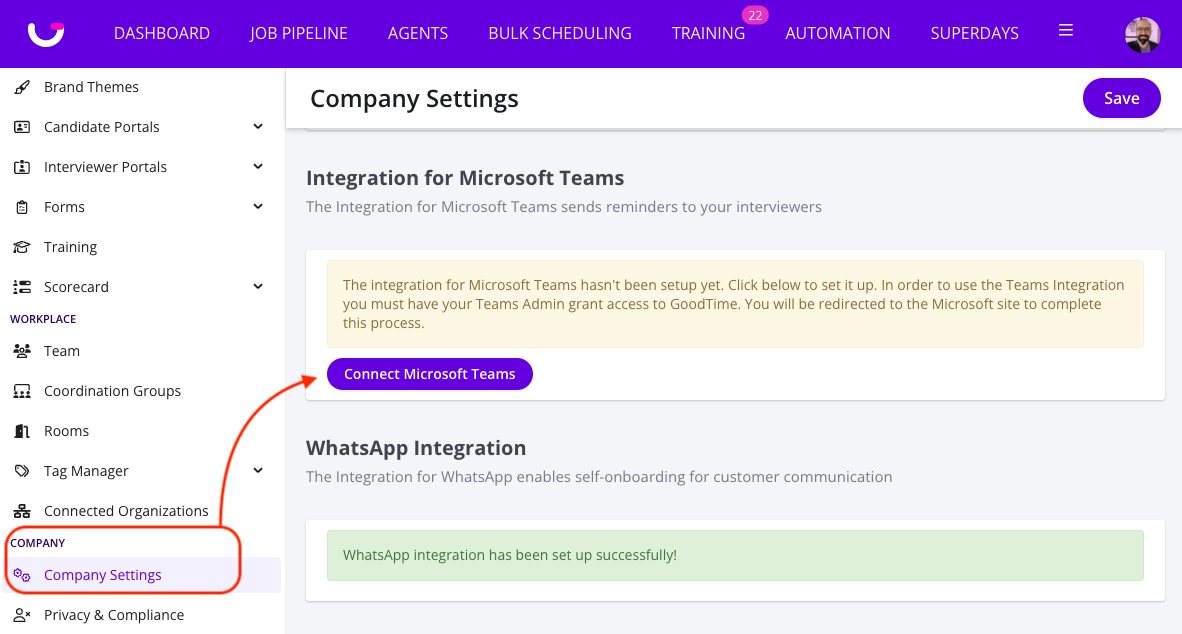
To establish an integration with your Microsoft Teams account you will need your Microsoft Teams admin (or IT team) to login to GoodTime and click on the 'Connect Microsoft Teams' button within the SETTINGS > Company Settings menu. From here, your Microsoft Teams admin will be redirected to the Microsoft site to complete the integration steps. The GoodTime Microsoft Teams integration can be found in the Microsoft Marketplace.
Where to Configure It in GoodTime
Once enabled, you can find Microsoft Teams Chat integration settings in:
GoodTime → SETTINGS → Company Settings → Integrations
You’ll see the existing Slack integration options, and you’ll now also see a new integration for:
What the Microsoft Teams Integration Can Do Today
1) Interview Reminders (Upcoming Interviews)
Interviewers can receive reminders in Teams that an interview is scheduled and coming up.
You can configure how far in advance reminders are sent.
2) Accept / Decline Reminders
Interviewers who have not responded to the calendar invite can receive a reminder in Teams prompting them to: Accept (e.g., “I’ll be there”) Decline
This helps coordinators and recruiting teams confirm interviewer attendance earlier and avoid last-minute schedule risk.
3) Scorecard Submission Reminders (Post-Interview)
After an interview completes, GoodTime can automatically send a reminder to complete the scorecard.
You can configure the timing (example: “1 minute after the interview ends” during testing), and most teams choose a short window so feedback is captured while it’s fresh.
4) “Send Me an Example” Preview Messages
Admins can send sample notifications to themselves from the Teams integration settings to preview what interviewers will receive. This helps you validate tone, timing, and message content before enabling broadly.
5) Automatic Interview Group Chat Creation (Microsoft Teams)
When scheduling an interview in GoodTime, you can create a Teams group chat/channel for everyone involved in the interview. This chat can include: Interview coordinator(s) Interviewer(s) Recruiter(s) Hiring manager(s)
You can configure: The channel/chat name; When the channel gets created (immediately, upon scheduling, or a set time before the interview); An optional default intro message
Interviewer Experience (What your Interviewers See in Teams)
Interviewers will receive messages from the GoodTime bot in Microsoft Teams, such as:
A prompt to Accept or Decline the interview A reminder to complete the scorecard A reminder that an interview is coming up soon
Messages include quick actions and links that can take the interviewer directly to the relevant context (such as the calendar event or scorecard experience).
Features Currently in Development (Early Access Roadmap)
The following capabilities are not fully available yet, but are actively being researched or built as part of Early Access development:
🔧 In Development
Decline reason capture Slack supports providing a decline reason today Teams does not yet support this (coming soon)
Template-level default Teams chat settings
Ability to pre-fill Teams chat/channel behavior inside an interview template So coordinators don’t need to configure Teams chat for every interview manually Interviewer-level notification toggles for Teams Similar to Slack reminder controls, allowing interviewers to self-manage their reminder preferences Planned expansion to Teams settings