Workday - Questionnaire/Scorecard Integrations
Last updated: October 1, 2026
TL;DR: A crucial piece of the interviewing process is your interviewers providing written feedback on the candidates they interviewed. In workday this is typically referred to as a 'Questionnaire', and in GoodTime we use the term 'Scorecard'. Regardless of what you may refer to it as within your organization, we are talking about the same thing - collecting written feedback from your interviewers to assist the Hiring Manager in making their hiring decision.
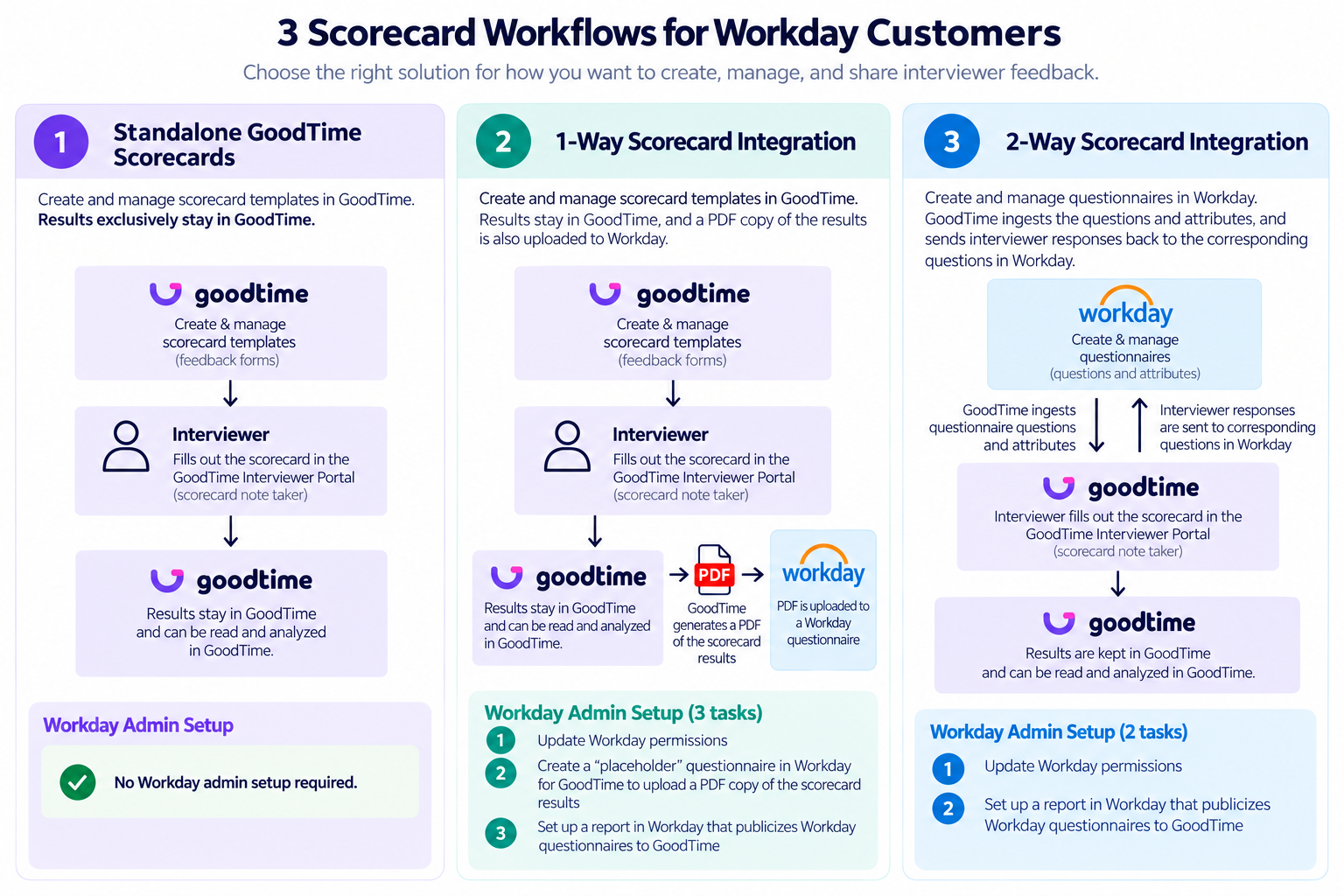
GoodTime provides 3x key ways in which WD customers can collect feedback form your interviewers. These 3x options are outlined in the image below and further elaborated upon in the sections below the image. Please be sure to speak with your CSM about which option might make the most sense for your organization and we can assist with any additional setup requirements associated with each option. Note, Option 3 is only available to customers using GoodTime's Experience+ package.
Option 1: WD Questionnaire Pass-Though
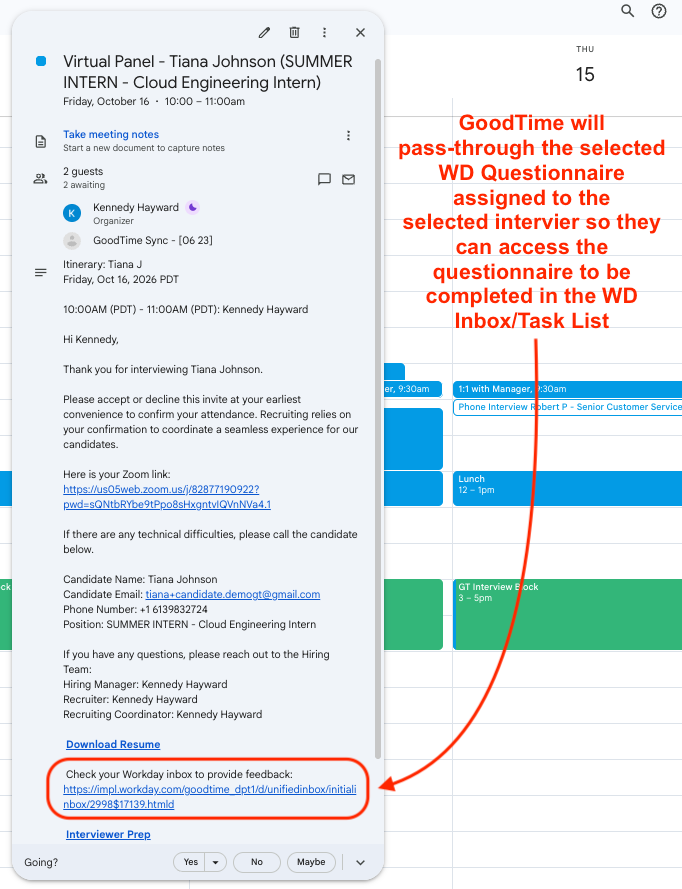
Overview: This is the standard GoodTime and WD Questionnaire integration. It relies on Questionnaires being created within WD directly by your team, and when they are assigned within WD, GoodTime will simply share a link to the assigned Questionnaire in the calendar event of the scheduled interviewer. i.e. the assigned WD Questionnaire is simply 'passed-though' to GoodTime
Note: The Questionnaire link shared with each interviewer in their calendar event will direct the interviewer to their WD Inbox/Task List, where a 'Complete Questionnaire' task will be present. It does not 'deep-link' directly to the Questionnaire itself.
Setup / How do I Access This? This option is available to all GoodTime HIRE customers with a WD Applicant Tracking System integration in place.
This standard questionnaire integration should be established as part of your initial GoodTime implementation. If you use WD 'Competencies' as well as WD 'Questionnaires' these can both be connected and used int he same pass-through manner.
Option 2: 2-Way Questionnaire Integration
Overview: The 2-way questionnaire integration between WD and GoodTime allows for your users to completed their assigned WD Questionnaire through the GoodTime Interviewer Portal and Scorecard Notetaker.
In this option, you would continue to create and/or edit your Questionnaires directly within WD, however GoodTime is provided a deeper level of access to the Questionnaire format in WD allowing us to streamline how your interviewers can fill-in their questionnaires; they can complete them directly in the GoodTime interviewer Portal instead of having to click through to their WD inbox.
Use this option if you wish to provide your interviewers a more user-friendly way to complete their questionnaires, but you wish to limit questionnaire creation and editing via admins in WD only.
Setup / How do I Access This? This option is available to GoodTime HIRE customers with the Experience+ module. GoodTime's Experience+ module provides access to the 'Interviewer Portal' which is a one-stop location to allow your interviewers to review a candidates resume, and prepare for an upcoming interview all form a single screen.
From within the GoodTime Interviewer Portal you interviewers will be able to complete the WD Questionnaire via the GoodTime scorecard notetaker window, and once the Questionnaire is submitted t will push back to WD in the assigned WD questionnaire fields.
To use this 2-way Questionnaire integration, your WD admin will need to update GoodTime's permissions to your WD instance and establish a WD Report that allows GoodTime to see the WD Questionnaire fields.
Option 3: 1-Way Scorecard Integration
Option 4: Standalone GoodTime Scorecards