GoodTime Multi-Tenancy Setup
Last updated: September 8, 2026
Overview
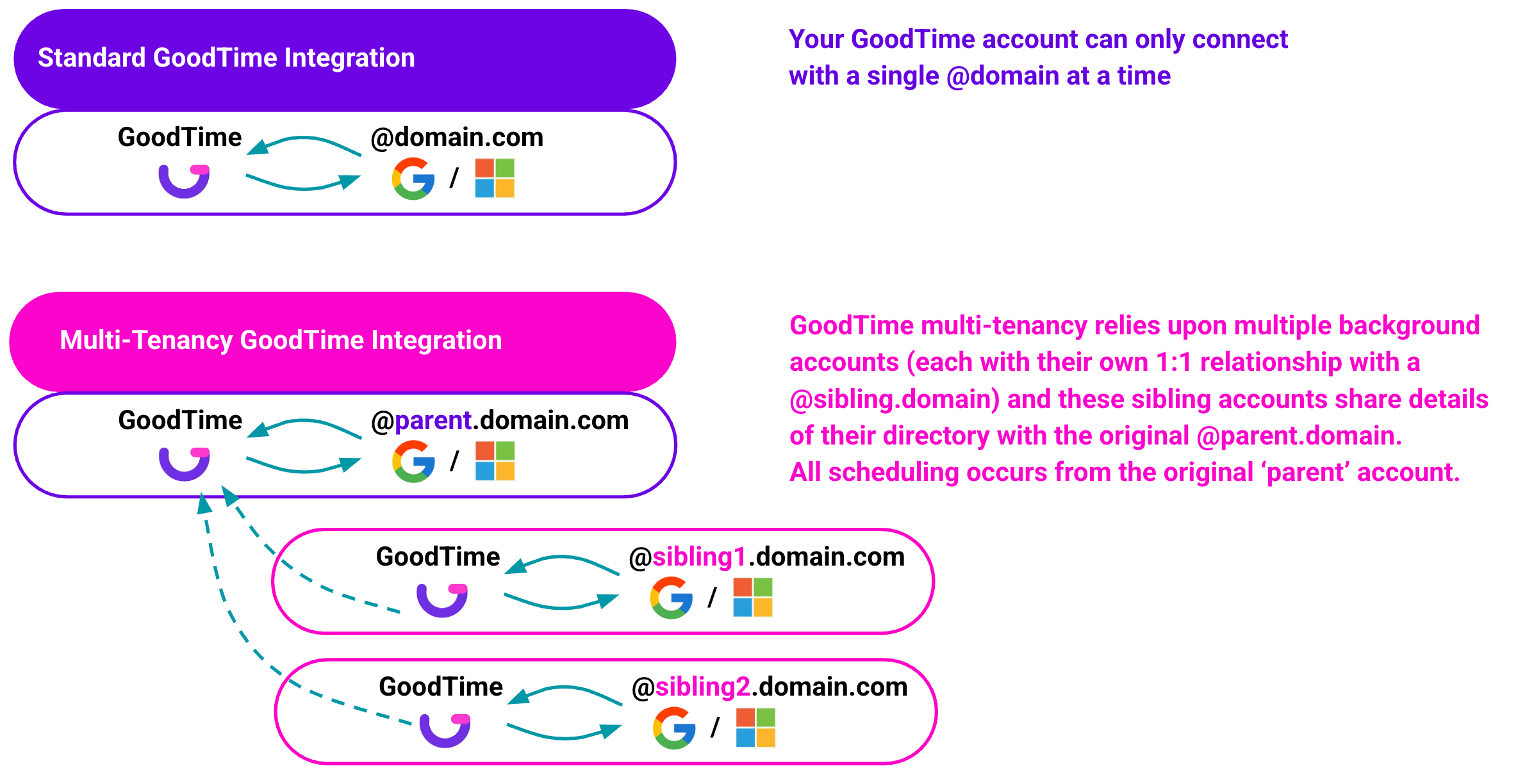
If your recruiting team also schedules for subsidiary organizations which have their own @domain and directory, GoodTime is able to support you in scheduling for these sibling Orgs via our multi-tenancy feature.
We refer to “parent” as the company who signed a contract with GoodTime and “sibling” GoodTime instance as the additional domains created to support additional scheduling scenarios.
Multi-tenancy, in the GoodTime context, refers to separate employee directories that can be linked together so that, from your parent GoodTime account, you are also able to schedule interviewers that may reside in your sibling organizations' employee directory.
NOTE: GoodTime charges an additional fee for establishing a multi-tenancy integration with additional domains on separate cloud servers.
If multi-tenancy would streamline your scheduling processes please contact your CSM to have a discussion about your unique needs and to receive pricing for establishing this integration. This service attracts a flat fee per additional domain with an additional activation fee charged by the hour to support troubleshooting unique to each sibling domains directory settings.
Setting Up Multi-Tenancy
In order to set up a multi-tenancy account with GoodTime, we recommend you do the following:
Book a time to meet with your Customer Success Manager (CSM). Not all companies operate the same way. Your internal directories may be structured in a way that does not require GoodTime multi-tenancy support or in a way that GoodTime unfortunately cannot support.
Its always best to start with a conversation to understand your unique needs; and if you do wish to move forward with multi-tenancy your CSM can offer a quote to establish this service.
If you choose to move forward with a multi-tenant setup, we require the following information in order to establish your sibling account and its connection to your @sibling.domain:
Identify your additional (sibling) @domain to be used.
Identify your initial Super Admin user who will log in to this new sibling account.
NOTE: Your initial user must be in the sibling domain directory.
Upon logging in, this user will authorize GoodTime access to the additional directory.
Once the GoodTime team has established your sibling account attached to your sibling domain you'll be introduced to one of our Professional Services Consultant to guide you through the connection steps, project timelines and launch with scheduling multi-tenancy.
🎉 Congratulations! Your Multi-Tenancy account is now active!
FAQ
How do I know if I need multi-tenancy or not?
It is helpful to answer these few questions:
Do each of your @domains have different calendars and email accounts? ALSO, do you use a separate @domain to login to each account to access these different email and calendars?
If YES; you are likely operating in a multi-tenant setup as each @domain has its own unique directory, email and calendar.
When someone emails you at each of the listed @domains, do their emails all land in the same inbox? Or if they book a meeting using either of your different @domains, do they land in the same calendar?
If YES; you are likely operating with an alias email address (and @domain) attached to your primary @domain.
Can I have sibling domains on a different cloud server to the parent? (i.e. Google vs O365?)
Yes. It does not matter which cloud server your sibling directory is on for them to be established and connected in a multi-tenancy arrangement.
Do I need to log in to my sibling accounts to schedule with those interviewers?
No. Once multi-tenancy is established, all of the team members / interviewers that are in the sibling directory can be seen and scheduled by the parent directory.
How does the candidate know which company they are interviewing with?
When you have subsidiary companies all with their own unique branding and logos, we recommend that you build dedicated interview templates and brand themes for all of your subsidiary companies (which are represented by your sibling domains).
Through the use of brand themes, you can schedule candidates for your parent account and they will always see branding relevant to the company they have applied to interview with.
Is multi-tenancy the same as having alias email addresses?
No. Many companies have alias email addresses in their directory. This means a user with the address—@parent.com—may also have an additional address—@parent.additional.com
Are there any restrictions to using interviewers from a sibling directory?
Yes. It is worth noting that GoodTime is architected to operate in a 1:1 relationship with a directory of potential interviewers. While multi-tenancy is a workaround that allows GoodTime to see and schedule interviewers from a sibling directory, we are unable to extend key GoodTime functionality like load balancing, reporting, or interviewer training to interviewers in the sibling directory. That is, it is expected behavior for any interviewer pulled from a sibling directory to NOT be able to have their load-balance automatically counted, be included in the automated interviewer training process, or have their actions captured as part of the Insights database.
TL;DR: GoodTime's multi-tenancy feature is best suited to ad-hoc usage of interviewers from a sibling directory as opposed to consistent scheduling using interviewers from this sibling directory. For users who find that they are routinely scheduling from the sibling directory and rarely use interviewers from both sibling and parent directories in the same interview, then there may be more operational efficiency to gain from operating as two separate GoodTime accounts, each connected to a different directory and the same ATS. Speak to your CSM to explore this option further.