Confidential Interviews
Last updated: October 19, 2026
Overview
Many Applicant Tracking Systems (ATS) provide the ability to mark a role/candidate as confidential or private so that details of that specific role or candidate are not shared outside of a small group of specified individuals. The GoodTime Confidential Interviews feature ensures that any role/candidate who is marked as confidential or private within your ATS can also be scheduled confidentially within GoodTime.
It is common to have the requirement to schedule a candidate in a confidential manner. Such examples of when you might want to do this are when:
scheduling internal candidates,
hiring a replacement confidentially for a senior-level departure that has not been announced,
hiring for positions associated with a new business vertical that has not been announced, or
scheduling interviews associated with the merger and acquisition process.
When a role or candidate is marked as confidential/private in a supported ATS, GoodTime will automatically reflect that confidentiality by hiding or masking data associated with that candidate or role. Only those with Confidential Interview Access turned on for them by a Super Admin in their user profile will be able to see these candidates or roles.
Typically, Confidential Interview Access grants a user the ability to see ALL confidential roles and candidates. Roles and candidates cannot be revealed selectively.
However, if you're using Greenhouse or Workday, it's possible to limit confidential candidate access based on your ATS permissions. Please consult your CSM if you want this setting to be enabled.
Enabling a user to have Confidential Interview Access will allow that user to access information about confidential jobs and candidates and give them the ability to schedule interviews for these candidates. These users can also see interview metrics about confidential interviews. Users without confidential access will not have access to any jobs, candidates, or interviews that are confidential. Only Super Admins can toggle this access for any users.

FEATURE ACCESS NOTE: If you do not see the ability for your Super Admin users to enable Confidential Interview Access (as shown above) for your users, speak to your CSM to have this feature activated in your account.
ATS setup for confidential candidates
ATS Setting | How GoodTime manages this confidential data | |
Greenhouse  | Candidates can be set to "private" | Interviews involving a "private" candidate will be automatically marked confidential |
Workday  | Job Requisition can be set to "confidential" | All interviews associated with a "confidential" job req will be marked confidential |
Lever  | Opportunity can be set to "confidential" | All interviews involving a "confidential" opportunity will be marked confidential |
SmartRecruiters  | Job Postings can be set to "private" | All interviews associated with a "private" job posting will be marked confidential |
Jobvite  | Job Posting type can be set to "internal" | Any job posting set to be "internal" will be marked confidential |
Review of Limitations
Roles and candidates shared with GoodTime BEFORE Confidential Data Access was enabled by GoodTime will NOT become private. Only NEWLY created confidential roles or candidates will adhere to your confidentiality settings from the ATS.
You cannot specify confidentiality on specific roles/candidates only. The GoodTime Confidential Roles feature is a company level setting and as such will operate across all of GoodTime when activated.
Any Super Admin user within GoodTime can give access to see confidential roles/candidate. You may want to conduct a strict review of your Super Admin users before activating confidential roles.
You cannot adjust confidentiality within GoodTime. The ATS controls all confidential designations.
Troubleshooting confidential-access errors
Missing user-level Confidential Interview Access can cause a direct dashboard link containing
guestIdto fail or a confidential candidate to be omitted from dashboard search results. Separately, when a candidate profile is launched from an ATS -- including through the Chrome Extension -- the messageUnable to load candidatecan indicate a confidential-access restriction in GoodTime rather than an ATS sync or Chrome Extension defect. This is especially relevant when the candidate or interview is marked as internal or confidential. Before diagnosing an integration issue, support should verify whether the candidate or interview is confidential and whether the affected user has Confidential Interview Access enabled.The Super Admin role and Confidential Interview Access are separate. Being a Super Admin allows the user to enable this user-level setting, but does not mean that the setting is already enabled. Only a Super Admin can enable it. Enabling access exposes all confidential candidates, roles, and interviews to that user, not just the individual profile being investigated, so users should follow their organization's access policy.
Notable Behaviors
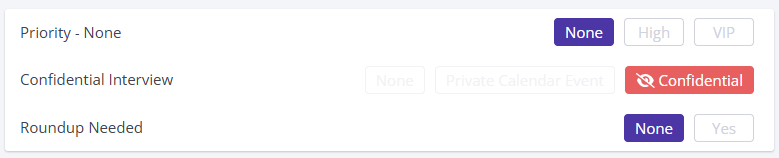
Interviews created with a Confidential Interview setting of Confidential are going to have both the interviewer and candidate calendar events created in the interviewer calendar.
The default interviewer calendar is set under Settings > My Account Settings > DEFAULT CALENDAR (TO CREATE EVENTS ON).
Full Guide
Please review the attached PDF document for further information about Confidential Roles within GoodTime.
Attachments:
Confidential_Interviews.pdf