HackerRank + GoodTime Integration Guide (Video)
Last updated: October 12, 2026

TL;DR: This guide is a step-by-step process on how to integrate HackerRank/CodePair with GoodTime. This guide requires the IT administrator to have or create a company account to generate the company-wide access token from HackerRank, which gives GoodTime the ability to interact with the HackerRank for Work API.
HackerRank Access Token for GoodTime
Go to: https://www.hackerrank.com/x/settings/api in your web browser (If you are not already logged in, log into HackerRank)

Under ATS Integrations, find GoodTime, and click "Generate new token". Copy the new token. You must have “Owner” permissions level in HackerRank in order to do this step.

Go to GoodTime Company Settings https://a.goodtime.io/dashboard/settings/company and scroll down to COLLABORATIVE CODING SERVICE INTEGRATION
Select HackerRank/CodePair as the Collaborative Coding Service type
Paste copied API key into the “API Key” field
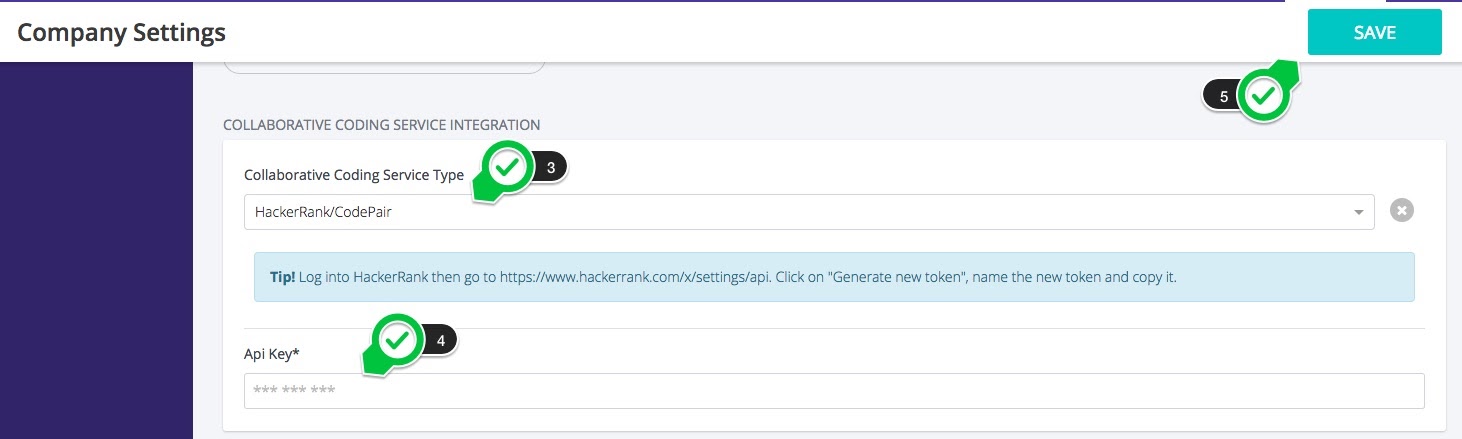
Press “Save” at the top left hand side of the page and you are done. Congrats!
Questions
Please contact support@goodtime.io.