Interview Template Folders + Bulk Actions
Last updated: September 8, 2026
TL;DR: Administer your GoodTime account more efficiently with the ability to sort your Interview Temples into folders and conduct bulk actions like linking Interviewer Training Paths, adding Interviewer or Candidate prep documents, moving folders or even deleting(archiving) Interview Templates.
🎥 Here's an overview of how to create folders and initiate bulk actions
Overview
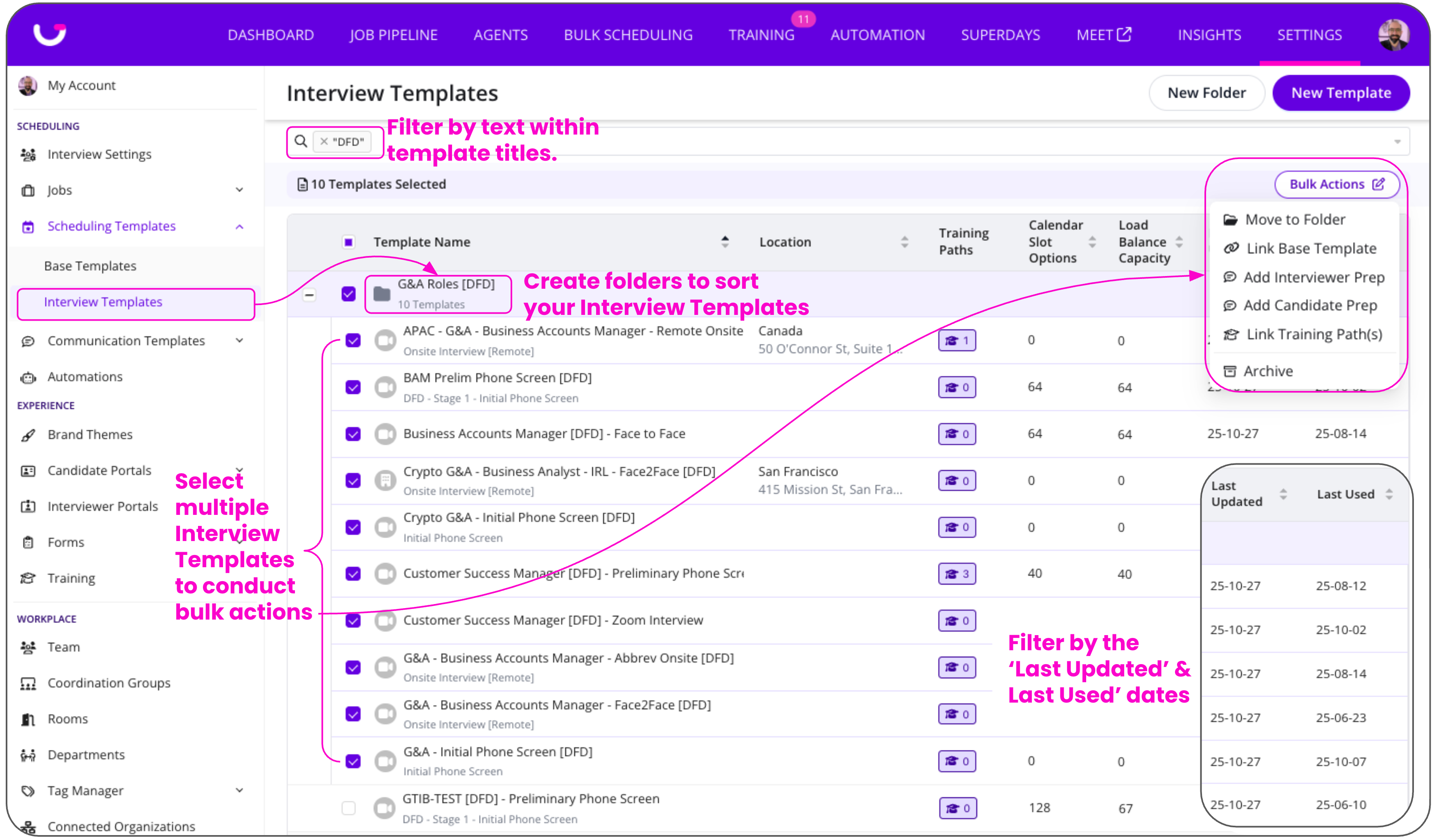
Here’s an overview of the key functionality you will find in the Interview Templates tab:
Create and organize templates
Create folders (e.g. by location, department, etc.).
Bulk assign templates to specific folders.
Perform Bulk Actions:
Move interview templates to folders
Link base templates
Add Interviewer Prep (Experience+ Package)
Add Candidate Prep
Add Interviewer Survey
Add Candidate Survey
Link Training Path(s)
Archive
New Filter Options
Filter Interview Templates by 'Last Update' date (to identify when they were last modified)
Filter by 'Last Used' date (to identify when a candidate was last scheduled via each template)