TL;DR: Here you will find a capture of all the product updates that the GoodTime product team have delivered this month. This article provides a continual overview of both minor product enhancements and our major product releases which we ship to continuously deliver efficiencies to our users. If you would like additional information on any of the features listed here please feel free to reach out to your Customer Success Manager.
In addition to this page you can learn about future GoodTime product updates via the following resources:
🎁20th | Are you looking for a recap of all the things we have been building? CLICK HERE for our GoodTime Aug 2025 Product Update |
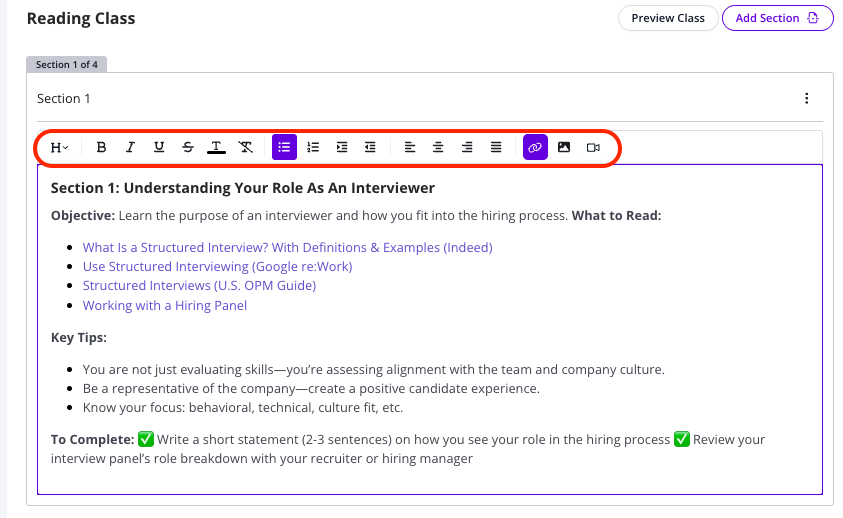
🎁18th | 🎨 Rich Text Editor for Portals/Training Classes:
GoodTime is releasing an update to our 'Rich Text Editor' that will allow all users greater ability to control the format and style of any text they generate within GoodTime - think specifically about Candidate facing email communications, Candiate and Interviewer Portal Prep templates, and all of your Trainee facing email communications.
You will see this update first within your Portal and Training Class area of the GoodTime Platform, with it soon to roll-out to all Candiate facing email communications.
What does a 'Rich Text Editor' update actually allow me to do? Change heading styles Control font colours Indent and Align options Strikethrough, underline, and bold options Embed videos and photos within: Training classes Candidate Portal
 |
🎁20th | Hybrid Interview Block Scheduling
In a key update to the GoodTime Interview Block feature, we have just launched something called 'Hybrid Interview Blocks' which allow for users to schedule key interviewers via GoodTime Interview Blocks (GTIB) only; even when on an interview templates with other users who are to be scheduled via Open Space in their calendar.
Please see the follwing vide for an overview of this new feature:
Overview of the new 'Hybrid' GoodTime Interview Block Feature:
Interviewers with Interview Blocks on calendar will have a 📅 icon that you can click (use GTIB) or unclick (use white space). Can be used with other interviewers who are being scheduled based on white space. You can change individuals preferences on the Team tab
|
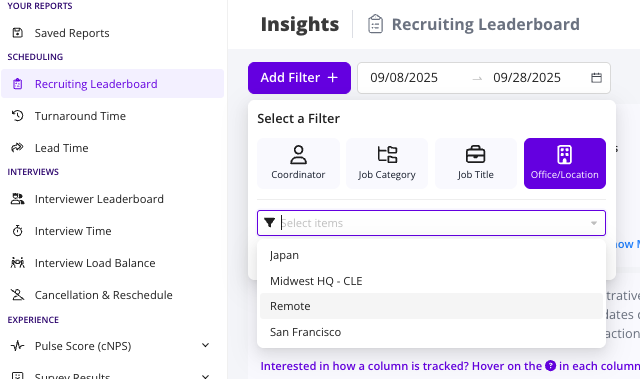
🎁20th | 🏢 Insights: Office/Location Filter:
In a small but powerful update, you can now now filter by office/location within the filter field of all insights reports. NOTE: This location/Office data is pulled directly from your Applicant Tracking System (ATS); specifically the Office/Location which is associated to each job posting within your ATS.
 |
Legend:
🎁 - GoodTime product enhancements (both big and small!)
🔧 - Progress upon a soon-to-be-released feature
🧪 - Feature available for Early Access use