Company-wide Calendars: How to Manage Interviewer Holiday Dates
Last updated: October 12, 2026
TL;DR: When you have company-wide or regional based calendars you can add them within GoodTime's Company Settings and GoodTime will consider them (and any listed holiday dates they reference) as part of your scheduling workflows.
While this is a powerful feature it may require that your company calendars are setup and maintained in a particular way to achieve the desired outcome.
This article lists the ways in which GoodTime Company-Wide Calendar feature operates.
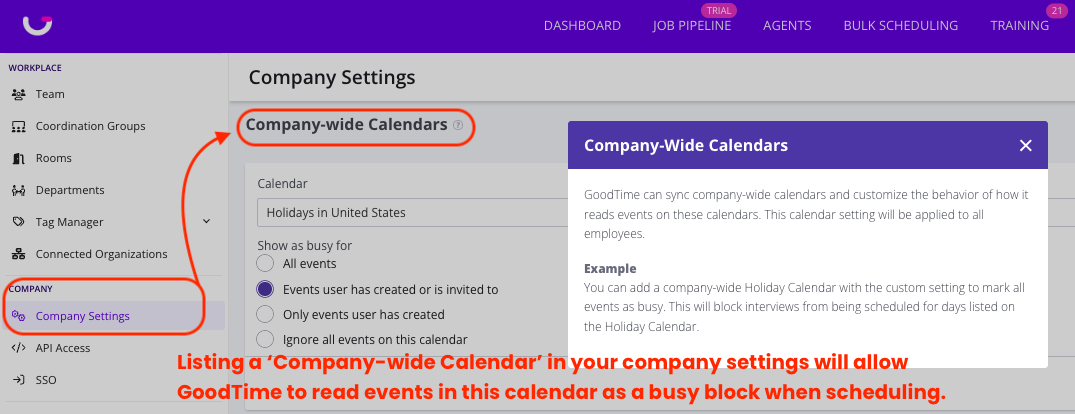
General Overview:
You can add a company-wide calendar with the custom setting to mark all events as busy. This will block interviews from being scheduled for days listed on the specified Holiday Calendar.
There are various ways you can utilize this feature, and they are primarily dependent upon the size and geographic areas in which your company employees reside. LIsted below are options on how you might use this feature:
Option 1: Have Interviewers just Block Their Own Calendars
This requires some change management and communications from your Head of Talent or Head of People. This would just require your interviewers to schedule a calendar block for your holidays.
Option 2: Create Separate Holiday Calendar(s) Per Country
If these are created already, who is invited to these calendars and who manages them? Does HR or recruiting own these calendars?
Pilot this option first with a subset of employees in a country with fewer interviewers.
Step 1: Create country specific calendars with holidays on them
Step 2: Invite interviewers or team members to the country specific calendar
Step 3: Once created and invited, go to Settings > Company in GoodTime
Scroll down to “Company Wide Calendars” section
In the drop down, select the name of the holiday calendar
In the “Show as busy for” options, select “Events user has created or is invited to”.
This will ensure all interviewers in the company are marked as busy for all holidays indicated on this calendar.
Caution (where it gets messy): If you have one Company Holiday Calendar for all regions, this will not work. For example, you may have May 30th, Memorial Day on your company holiday calendar. This would then impact your employees in France or China, you would not be able to schedule on this day.