iCIMS + GoodTime Integration Guide
Last updated: March 5, 2026

TL;DR: GoodTime integrates with the iCIMS Applicant Tracking System (ATS) in order to provide the scheduling benefits of GoodTime on top of the regular candidate and recruitment process management offered by iCIMS.
Prerequisites:
For initial configuration, the user will need to have administrator access on iCIMS and super admin access on GoodTime.
Each GoodTime + iCIMS installation will need the iCIMS Streaming API and there is a cost associated with this through iCIMS. To purchase the license to use the Streaming API from iCIMS, please engage with your iCIMS Implementation Manager (or Account Executive) to let him/her know that you are wanting to deploy the GoodTime integration. Inform your Implementation Manager that you need the Streaming API access in the project. You will likely need to execute an SOW with iCIMS to get an implementation resource assigned to the project.
When meeting with your Implementation Manager, the following items should be discussed, requested or granted:
The Implementation Manager from iCIMS will enable GoodTime with the necessary credentials to access the Streaming API.
You will need to inform your Implementation Manager what fields you wish to sync using the Streaming API. A “channel” will be created to sync the specified fields.
The Implementation Manager will assign a CustomerId and StreamId to identify your iCIMS tenant and channel.
GoodTime will use the CustomerId and StreamId to access your data in iCIMS going forward.
Bins and Statuses
From iCIMS, you will need to extract and capture your list of bins and statuses that will then be ported into GoodTime to allow for integration events. Following is a sample listing of what GoodTime is requesting. Bins and statuses are created/updated and exported to you from an iCIMS resource.
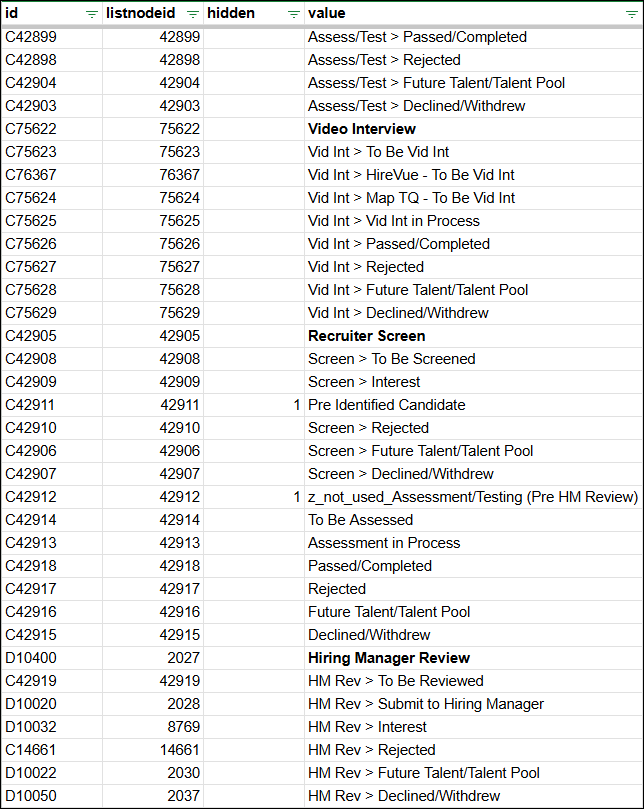
Important note: "iCIMS bins & statuses" are synonymous to "GoodTime stages" and how GoodTime tracks the “status/stage” the candidate is in when scheduling.
GoodTime Configuration
Follow the steps to complete the set up for the iCIMS and GoodTime Integration
Grant API Access
Option 1: Connect your CustomerId to GoodTime’s clientId
GoodTime’s clientId credentials are:
For list/profile/search/dataStream:
bsSwDDcdy7lDRJbgqPDZkswtSu8TcrUSFor interview-service API/feedbackForm API:
UmI31wQb6RXZUYRmUy7wWEjU5PvbFG7x
Provide GoodTime with CustomerId (iCIMS Implementation Manager can provide)
Option 2: Set up your own Client ID & Client secret & provide them to GoodTime Team in a secure manner
iCIMS to grant following scopes to GoodTime’s client:
Data-stream:stream:readdata-transfer-assembler:stream:read
if wanting interview to sync back to iCIMS, also:
interview-service:interview:createInterview-service:interview:readInterview-service:interview:updateinterview-service:interview:delete
if using feedback forms, also:
biz-collab-feedback-service:feedbackReq:rwbiz-collab-feedback-service:forms:ro
Provide GoodTime with a list of Bins & Statuses
Identify which statuses you want to trigger to schedule in GoodTime.
iCIMS to place GoodTime’s webhook address for the statuses they want to use as triggers.
US GoodTime servers: https://a.goodtime.io/v2/ats/webhook/icims
EU GoodTime servers: https://eu.goodtime.io/v2/ats/webhook/icims
Once all steps are completed, GoodTime can begin the data sync. The length of the sync is dependent on how much data is in iCIMS.
The default sync is about 80K calls per an hour and includes all jobs, candidates, and users.
The GoodTime Integration leverages the iCIMS Streaming API, iCIMS Profile API and iCIMS List API.
Entities Synced and Frequency
| Notes | Frequency |
Jobs | GoodTime imports all jobs except those with status deleted | GoodTime attempts a sync every 5 mins. However there is roughly a 6 min delay when brand new data is created until the API returns a valid response. |
Candidates | Candidates under the iCIMS folder Cand:Active are synced. If needed, additional folders can be configured to be synced. | 5 minutes (see comment above) |
Applications | Applications are not synced by default. The application is queried live at the moment of scheduling. | There is also a roughly 6 minute delay on the iCIMS platform between the moment the application was created, to the moment it is available in the API. |
Stages | iCIMS terminology: Stages are called Bins/Statuses in iCIMS. These rarely change, and are not being synced regularly. Instead, these are provided to GoodTime during the onboarding process and imported manually. | Manual sync *If Bin/Statuses ever change, the customer will need to provide the updated list to their GoodTime CSM to re-sync. |
Users | Users in the iCIMS folders HM:Active Emp:Current Employee are synced. If needed, additional folders can be configured to be synced. | 5 minutes (see comment above) |
Resume | Resumes are not synced, but when needed, the URL is retrieved live and served at the moment of usage. | Live |
Hiring Team | Hiring Manager, Recruiter, Coordinator & Sourcer are synced | Live |
Fields Reference - GoodTime pulls from iCIMS:
Person: (click to open)
firstname
lastname
middlename
email
folder
phones
location
resume
updateddate
Recruiting Workflow: (click to open)
associatedprofile
baseprofile
source
sourceperson
bin / status
updateddate
Job: (click to open)
jobid
jobtitle
folder
hiringmanager
recruiter
secondaryrecruiter
jobowner
joblocation
updateddate
Schedule iCIMS Candidate in GoodTime
Video clip: Scheduling a candidate for an interview
Optional Setup
If preferred, GoodTime is able to automatically advance the candidate into the next Status in iCIMS. This will occur immediately once the candidate is opened in GoodTime (For example - trigger for scheduling is “Availability Requested” → Moved immediately into “Interview scheduled”). Please inform your GoodTime Professional Services Consultant so they can appropriately set up this workflow.