How Date & Time Formats Display in GoodTime
Last updated: February 26, 2026
TL;DR:
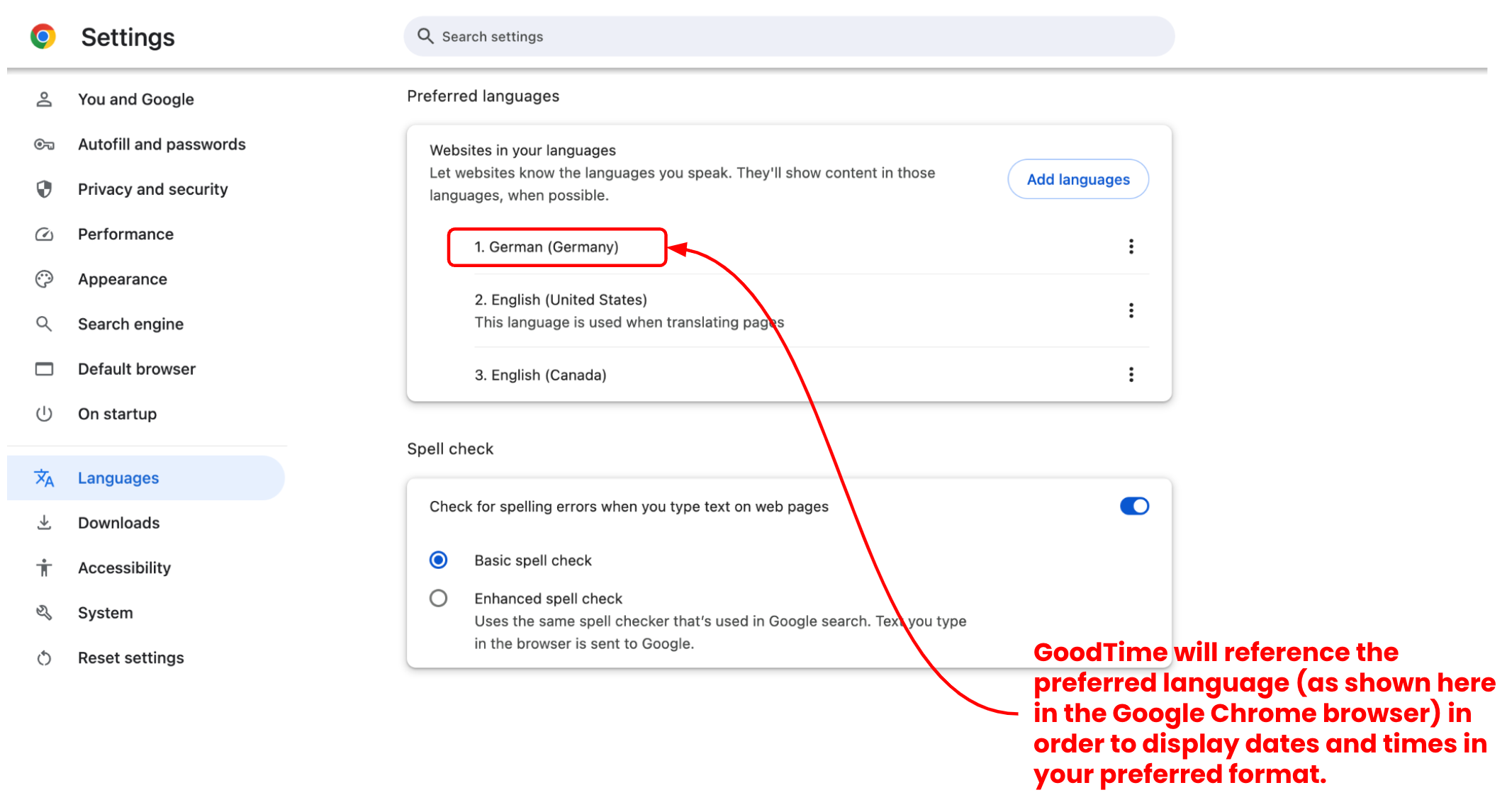
GoodTime as a tool is often used by globally distributed scheduling teams. To support global teams GoodTime has been designed to support time and date localization. This means that when it comes to the DISPLAY of date and time formats GoodTime will mirror the relevant date and time format indicated by the 'Languages' settings from your web browser.
For example; users whose browser is set to 'English (American)' language will see the mm/dd/yyyy date format and times will represent in the 12h format. On the other hand, users with their browser language set to 'German (Germany)' will see the dd/mm/yyyy date format and times will represent in the 24h format. See the image below for an example of how your browser language impacts your date and time format:

Date Formats:
GoodTime users in different regions will see localized date formats (based on their web browser 'Languages' settings) as follows:
EMEA / European Users: European date formats (dd/mm/yyyy)
NAM/LATM / American Users: US American date formats (mm/dd/yyyy)
APAC / Asian Users: Future GoodTime versions will also support the Asian date format (yyyy/mm/dd).
Please note that there are also variations within the above date formats; for example, Germany and Italy commonly use the “.” as separator while Spain often uses the “-” as separator”
Time Formats (12h vs 24h):
Most of the world uses the 24 hour time format, while the US continues to use the 12 hour format with the AM/PM annotation. GoodTime users in different regions will see localized time formats (12h or 24h) based on their web browser 'Languages' settings.
Change your Localization / 'Languages' Setting in Chrome:
In order to adjust your localization configuration within Google Chrome please following the steps outlined below to update your 'Languages' preferences:
- In Chrome, navigate to the Chrome kebab menu (vertical ellipses) in the upper right corner of your browser;
- Click on the the three dots and select Settings;
- In the Settings menu on the left, select Languages;
- In the top 'Preferred Languages' menu you can review the different language formats recognized by your browser.
- If only 'English (United States)' is installed (or it is at the top of your preferred language list); GoodTime will present your date and time format in the standard North American style.
To change how your date and time format is presented: - Click Add → to add a language with et appropriate date and time format you wish to see. You should also move the preferred language to the top of the list spot by clicking the kebab menu next to the language and then select “Move to the Top”;
- Once the preferred language has been moved to the top, your browser will reflect this as the default language moving forward. You may need to refresh the tab that runs the GoodTime applications for your changes to take effect. You will see now all date / times reflected in the format relevant to your preferred language.