8. Tags Overview
Last updated: February 26, 2026
GoodTime uses 'tags' to classify your interviewers & rooms.
The level to which you build out your tags is based on 1) what data you're looking to analyze and 2) your current (or desired) interviewer selection process.
Step 1: SET UP BASIC LEVEL TAGS
Basic level tags will help you:
- Adjust team member settings in bulk,
- Pull insights for a specific set of users or interviewers
In this video, we discuss the basics of tags and how to use them as filters to set business hours, load balance or pull a report on a particular team.
What are Tags?
Tags are a keyword/term that you assign to an interviewer or room. Tagging allows GoodTime to better understand the classification of your company and streamline the interview scheduling process
What are tag types?
Tag types are a way for you to organize your collection of tags to make them more searchable by you team.
Step 2: SET UP ADVANCED LEVEL TAGS
Advanced level tags will:
- Be used as part of your interview scheduling and template creation process to define the interviewer or room 'pool' that you want associated with the interview event you are scheduling.
Tags and Boolean Search Logic:
You are able to use Boolean search logic (AND, OR and NOT) together with the tags you create in order to refine or expand the 'pool' of tagged interviewers or rooms you wish to use when scheduling. Below are some examples of what Boolean searched would look like when used in conjunction with tags:
-
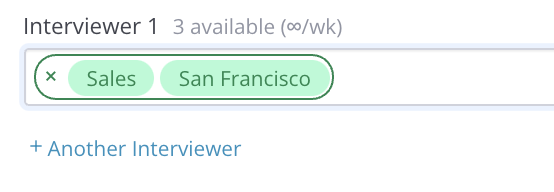
AND - Represented by a green border that groups tags together. Used to narrow the tagged search. In the example below we are seeking an interviewer with BOTH the 'Sales' AND 'San Francisco' tags:
-
OR - Represented by the green border separating tag groups. Used to broaden the tag search. In the example below we are seeking a 'Sales' interviewer in 'San Francisco' OR a 'Sales' interviewer in 'London'. Also of note, the GoodTime search algorithm will see these tag groups preferentially and will first search for a 'Sales' AND 'San Francisco' tagged interviewer before searching for a 'Sales' AND 'London' tagged interviewer.
#sales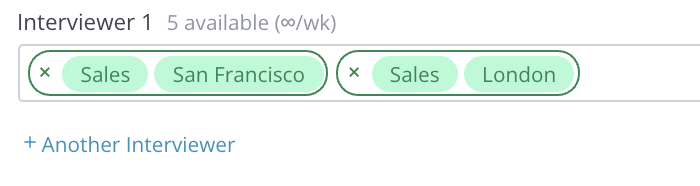
-
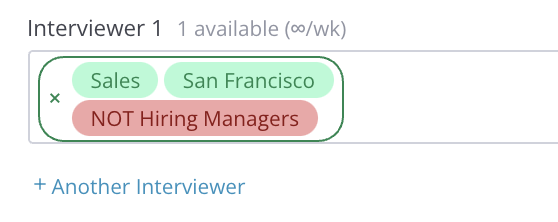
NOT - Represented in red, the NOT function will exclude specific tags from the search. In the example below we are seeing an interviewer who has a 'Sales' AND 'San Francisco' tag but is NOT tagged as a 'Hiring Manager'.
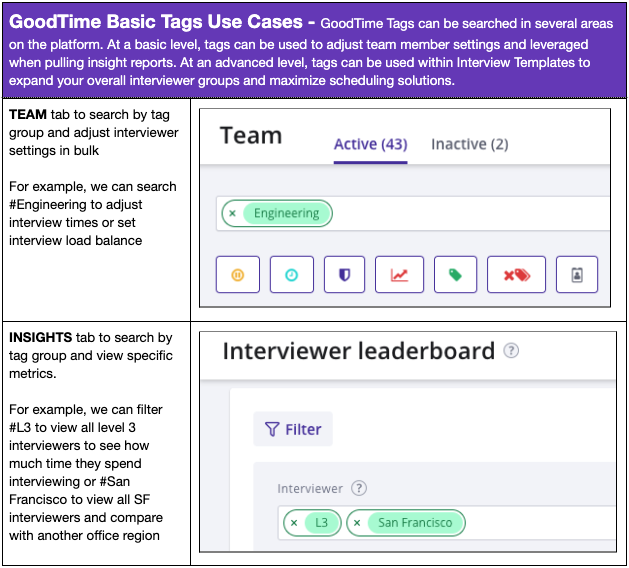
- Utilizing tags to set interviewer load balances allows GoodTime to evenly spread interviews across the team and reduce interviewer burnout which can negatively impact candidate experience
- Tags allow for you to filter and pull data from the GoodTime insight tab based on specific user or interviewer groups. This can allow for deeper analysis of which interviewers, departments or interview styles are your most or least efficient.
- Ex: Adding in a department level tag can showcase interviewer behavior such as acceptances or declines
Other Related Articles: